Magento 2 Request for Quote Extension — EasyQuote B2B Email Quote with Cart-Native Workflow

 Magento 2.3.5 - 2.4.8 · Community, Enterprise, Cloud
 Unlike most RFQ extensions that add a separate quote cart, EasyQuote works directly inside Magento's native shopping cart — customers request quotes in one click without losing their shopping session. Approved quotes convert to orders via a one-click checkout link, cutting conversion time from 5–8 minutes to under 60 seconds. Cart-native integration, tier pricing, full GraphQL/REST API — from €179.
Screenshots
A quick glance at frontend and backend functions.


EasyQuote Feature Guides
Eight in-depth guides cover every part of the extension — from the customer’s first enquiry to the invoice. Jump to any category, or start at the hub for the complete 118-feature overview.
Quote Creation
Cart, mini-cart & admin-side quote builder
Pricing & Tier Pricing
Per-line custom prices, tier tables, discounts
Proposals & PDFs
Branded PDF proposals, templates, terms
Email & Messaging
13 events, 17 templates, message thread
Shipping & Checkout
Quote shipping, 1-click hand-off to checkout
Workflow & Reporting
9 statuses, history log, admin grid
API & Integrations
11 REST endpoints, GraphQL, Breeze/Hyva
B2B Use Cases & Config
Visibility rules, backorders, per-group config
118 features across 8 categories — all in one convenient page
Why do enterprise B2B stores choose EasyQuote?
Native Cart Integration
Leverages Magento's native shopping cart without duplicate infrastructure. Customers request quotes without leaving their flow, maintaining cart persistence and reducing friction.
Fast Quote Conversion
Quick Checkout Links eliminate the 7-step conversion process. Pre-populated data enables one-click order creation, reducing time from 5-8 minutes to under 30 seconds.
Advanced Tier Pricing
Offer volume-based pricing with multiple quantity/price tiers in a single quote. Customers select their preferred tier, system automatically applies correct pricing at checkout.
Complete API Coverage
Native GraphQL and REST APIs for PWA, mobile apps, and custom storefronts. Quote retrieval with flexible filtering, request submission, and cart integration with JWT authentication.
Theme Agnostic
Official compatibility modules for Hyvä and Breeze themes. Full Hyvä CSP compliance for enhanced security. Works seamlessly with Luma and custom themes. WCAG 2.1 AA compliant for accessibility.
Flexible Integration
Built on Magento best practices with clean architecture. Easy to extend via plugins and events. Compatible with major B2B extensions.
Who Should Choose EasyQuote?
Determine if this is the right RFQ solution for your Magento 2 store
Perfect For
- B2B Wholesale Distributors - Multi-tier pricing, volume negotiations, corporate buyer workflows, quote approval processes
- Custom Product Manufacturers - Made-to-order items, configurable products requiring quotes, complex pricing calculations, project-based pricing
- Enterprise stores with existing B2B - Already using Magento B2B features, need quote functionality without Adobe Commerce, require API integration with ERP/CRM
- Headless Commerce implementations - PWA storefronts requiring quote functionality, mobile apps with B2B features, custom frontend frameworks, omnichannel quote management
Not Ideal For
- Simple product inquiry forms - If you only need "contact us for pricing" forms without cart integration, quote management, or order conversion, a basic contact form extension will suffice
- Pure B2C retail stores - EasyQuote focuses on B2B pricing negotiations. For B2C stores without wholesale operations, standard Magento features may better fit your needs
- Extremely complex multi-level approvals - While EasyQuote supports proposal workflows, stores requiring 5+ approval levels with custom routing might need specialized approval workflow extensions
- Payment processing within quotes - EasyQuote converts quotes to standard Magento orders for checkout. Payment happens through Magento's standard checkout flow
Technical Specifications
Platform Compatibility
| Magento Versions | 2.3.5 - 2.4.8 |
| PHP Support | 7.2, 7.3, 7.4, 8.0, 8.1, 8.2, 8.3, 8.4 |
| Magento Editions | Community, Commerce, Cloud |
| Theme Compatibility | Luma, Hyvä (native module + CSP compliant), Breeze (native module), Custom themes |
| B2B Compatibility | Compatible with Magento B2B module |
Performance Metrics
| Quote Form Load Time | <100ms |
| Checkout Link Processing | <50ms |
| Quote Grid Load (1000+ quotes) | <500ms |
| API Response Time | <200ms |
| Max Quote Items Supported | 150+ |
API Capabilities
| Feature | GraphQL | REST API |
|---|---|---|
| Retrieve Quote by ID | ||
| List/Search Quotes | With filters | |
| Retrieve Quote Items | ||
| Submit Quote Request | ||
| Add Quote to Cart | ||
| Retrieve Requests | ||
| Filter by Customer | ||
| Filter by Order ID |
Security & Data Management
Core Features
One-Click Quote from Cart
Customers request quotes directly from shopping cart without page redirections or data loss:
- Single "Request Quote" button replaces or supplements "Proceed to Checkout"
- Cart items automatically transfer to quote with quantities, configurations, and custom options preserved
- Customizable request forms - configure which information customers provide (delivery timeline, project specs, budget, special requirements)
- Multi-language support per store view
Technical benefit: Zero cart synchronization issues, lower maintenance overhead compared to systems with separate quote carts.

Centralized Quote Dashboard
Manage all quotes efficiently from Magento admin panel:
- Filterable grid - By status, date, customer, amount
- Quick actions - Approve, Edit, Send Proposal, Reject
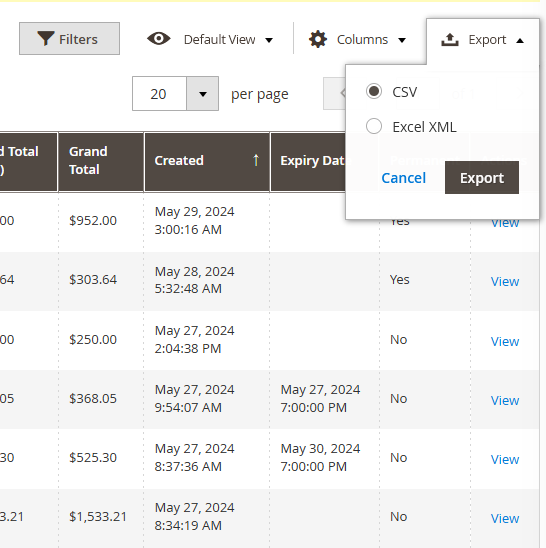
- Export quote data - CSV, XML formats
- Search capabilities - By customer, quote ID, or product SKU
Create quotes from admin:
- Sales representatives can initiate quotes on behalf of customers
- Select customer account and add products from catalog
- Set custom pricing per item
- Include admin notes and terms
- Send proposal directly to customer
Edit quote details: Modify quantities, adjust pricing, add/remove products, include shipping costs, set expiration dates, add internal comments.

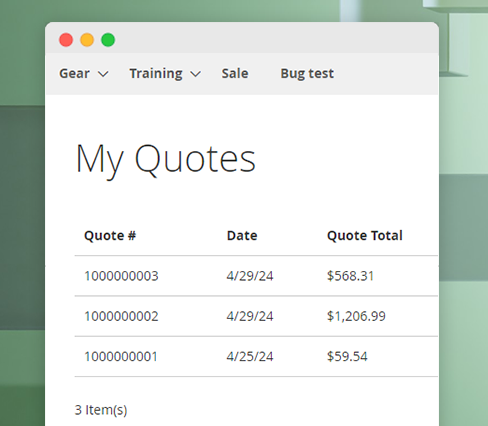
Customer "My Quotes" Dashboard
Customers access all submitted and historical quotes from their account area:
- Real-time status updates - Pending, Approved, Expired
- View negotiated prices and terms with clear comparison to original pricing
- Download PDF quotes for records and offline review
Quote detail view includes:
- Full itemized quote display
- Original vs. negotiated pricing comparison
- Shipping information and delivery timeline
- Admin comments
- Action buttons (Accept, Decline, Convert to Order)
How does EasyQuote handle pricing and discounts?
Tier Pricing for Quotes NEW v1.4
Offer volume discounts within single quote with multiple price points:
- Define 3-5 quantity tiers - Example: 10 units @ $50, 50 units @ $45, 100 units @ $40
- Customer selects preferred tier - Self-service volume selection
- Automatic price calculation based on tier selection
- Dynamic tier visibility based on customer group
Configuration options:
- Set default selected tier
- Require minimum quantity per tier
- Display savings percentage per tier
- Hide/show tier pricing to specific customer groups
Business impact: Encourages larger orders without separate quote submissions. Wholesale customers self-select appropriate pricing tier, reducing admin workload.

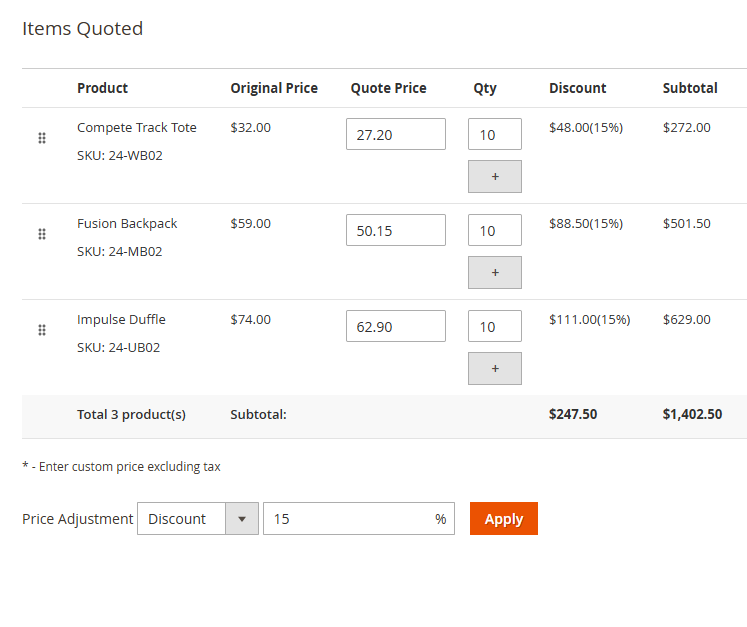
Per-Item Custom Pricing
Admin can set unique pricing for each quote item with flexible price adjustments:
- Absolute price - Set exact dollar amount
- Percentage discount - Apply percentage off retail (e.g., 15% off)
- Fixed discount - Subtract fixed amount per unit (e.g., $10 off)
- Display original price with savings to customer
Discount transparency:
- Show original catalog price alongside quoted price
- Display discount amount and percentage
- Calculate total savings across entire quote
- Optional: Hide original price, show quoted price only
Coupon code control:
- Enable/disable coupon codes for quote items
- Apply promotional rules to quoted items
- Restrict coupon stacking on quotes
Interactive Proposal System
Two-way communication system for quote negotiation:
- Admin sends formal proposal with pricing and terms
- Customer receives email with proposal details
- Customer can Accept or Decline proposal
- When declining, customer provides reason for better negotiation
- Comment system for back-and-forth negotiation
Customer response options:
- Accept Proposal - Triggers automatic quote approval, ready for checkout
- Decline Proposal - Provide reason (price concerns, shipping terms, delivery timeline), admin receives notification and can revise proposal
- Add Comments - Request clarifications or modifications without formal decline
Proposal features:
- Set proposal expiration dates
- Automatic expiration reminders (3 days before expiration)
- Proposal acceptance triggers automatic quote approval
- Configurable auto-approval for accepted proposals
Status progression:
Draft ? Pending ? Proposal Sent ? Awaiting Customer Review ? [Accepted ? Approved] or [Declined ? Pending Revision] or [Expired]

Quick Checkout & Conversion
One-Click Checkout Links NEW v1.2
Eliminate conversion friction when admin approves quote with secure, pre-populated checkout links:
- Pre-populates all customer information - Name, email, shipping/billing addresses
- Applies negotiated pricing automatically - Locked pricing regardless of catalog changes
- Pre-selects shipping method and address from quote
- Auto-logs customer into account - No login required
- Direct access to payment step - Skip entire configuration process
Email integration:
Checkout link included in quote approval email:
"Your quote #12345 has been approved! Click here to complete your order: [Proceed to
Checkout]"
Technical implementation:
- Secure tokenized URLs
- Validates customer identity
- Preserves quote pricing even if catalog prices change
- Prevents pricing manipulation
Performance metrics: Traditional quote-to-order: 5-8 minutes | Quick Checkout Link: 30-60 seconds | Conversion rate increase: 35-40%

Direct Order Conversion
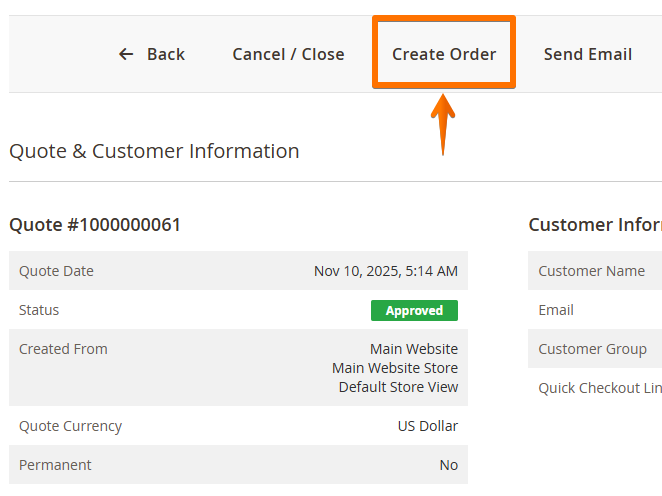
Admin-initiated order creation:
Convert approved quote to order from admin panel:
- Generate order with quoted prices
- Pre-fill customer shipping/billing addresses
- Apply quoted shipping method
- Mark quote as "Purchased" status
- Send order confirmation to customer
Customer-initiated checkout:
From "My Quotes" dashboard:
- "Quick Checkout" button on approved quotes
- Redirects to checkout with quote data pre-filled
- Standard Magento checkout process - Familiar customer experience
- All payment methods available - No restrictions on payment options
Shipping Management
Capture shipping details during quote request:
- Customer provides shipping address with quote
- Admin sees shipping destination before pricing
- Calculate accurate shipping costs for quote
Admin shipping configuration:
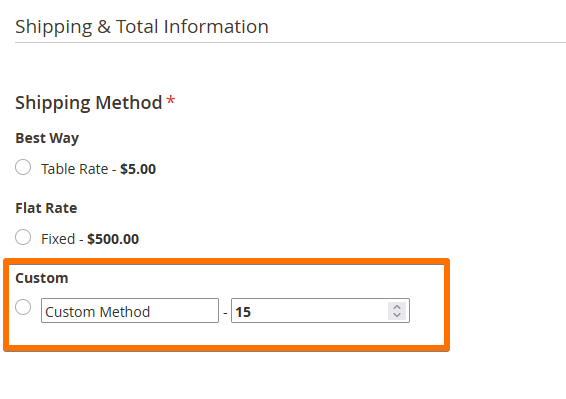
- Select shipping method for quote (Flat Rate, Table Rate, Free Shipping)
- Set custom carrier title - "Special Delivery", "White Glove Service"
- Set custom method title
- Include shipping cost in quote total
- Allow/restrict shipping method changes at checkout
Shipping information display:
- Shown in admin quote view
- Included in customer "My Quotes" view
- Present in PDF quotes
- Included in all email communications
Checkout integration: Approved quotes pre-select specified shipping method with option to lock shipping method (prevent customer changes). Shipping cost preserved from quote to order.
What email notifications does EasyQuote send?
Automated Customer Notifications
Quote lifecycle emails:
- Quote Submitted - Confirmation email with quote details
- Quote Updated - Admin made changes to quote
- Proposal Sent - Formal proposal with pricing ready for review
- Quote Approved - Final approval with checkout link
- Quote Rejected - Rejection with optional admin explanation
- Proposal Accepted - Customer accepted proposal (triggers approval)
- Proposal Declined - Customer declined proposal
- Expiration Reminder - X days before quote expires
- Quote Expired - Quote passed expiration date
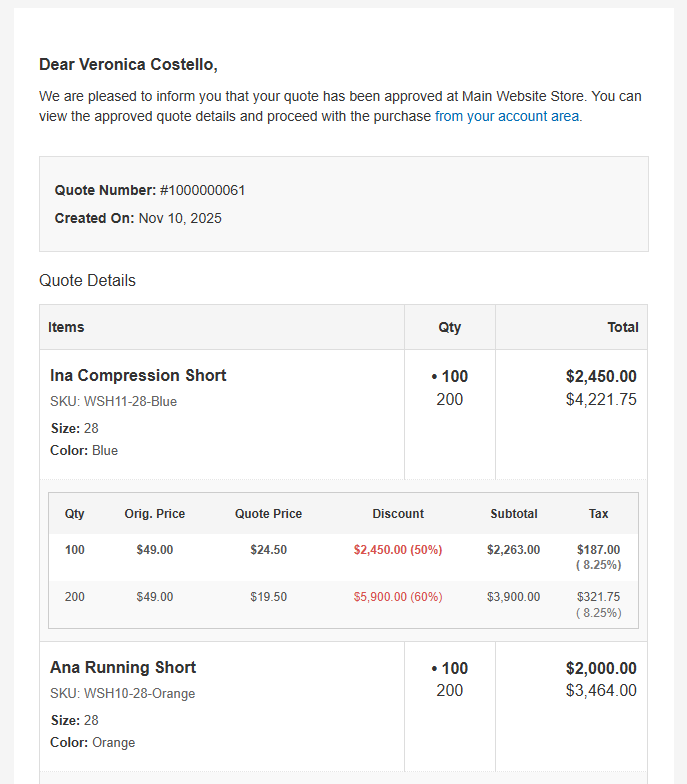
Email features:
- Professional HTML templates per store view
- Customizable email content and styling
- Include PDF quote attachment
- Display itemized quote with pricing
- Show original vs. quoted prices
- Tier pricing information
- Shipping details
- Admin comments
- Quick action buttons (Accept Proposal, View Quote, Checkout)
Admin Notifications
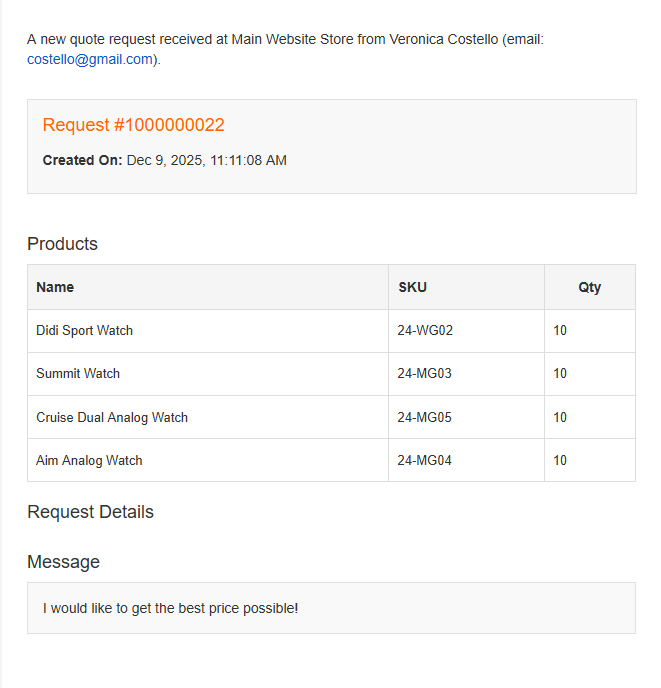
Real-time admin alerts:
- New quote request received - Immediate notification with quote details
- Customer accepted/declined proposal - Action required notification
- Customer modified quote and resubmitted - Review changes
CC email support:
- Add multiple recipients to quote emails
- Notify sales managers, account managers
- Different CC list per store view
- Visible in admin panel for reference
Comments & Internal Notes
Per-item comments:
Admin can add comments to individual quote items:
- "This item requires 2-week lead time"
- "Custom color: Pantone 287C"
- "Engraving: 'ABC Company Logo'"
Customer visibility:
- Comments displayed in customer quote view
- Included in quote emails
- Present in PDF quotes
- Configurable: Transfer comments to order items
Internal admin comments:
- Add internal notes invisible to customers
- Collaborate on complex quotes
- Document pricing decisions
- Track quote history and changes

What documents can EasyQuote generate?
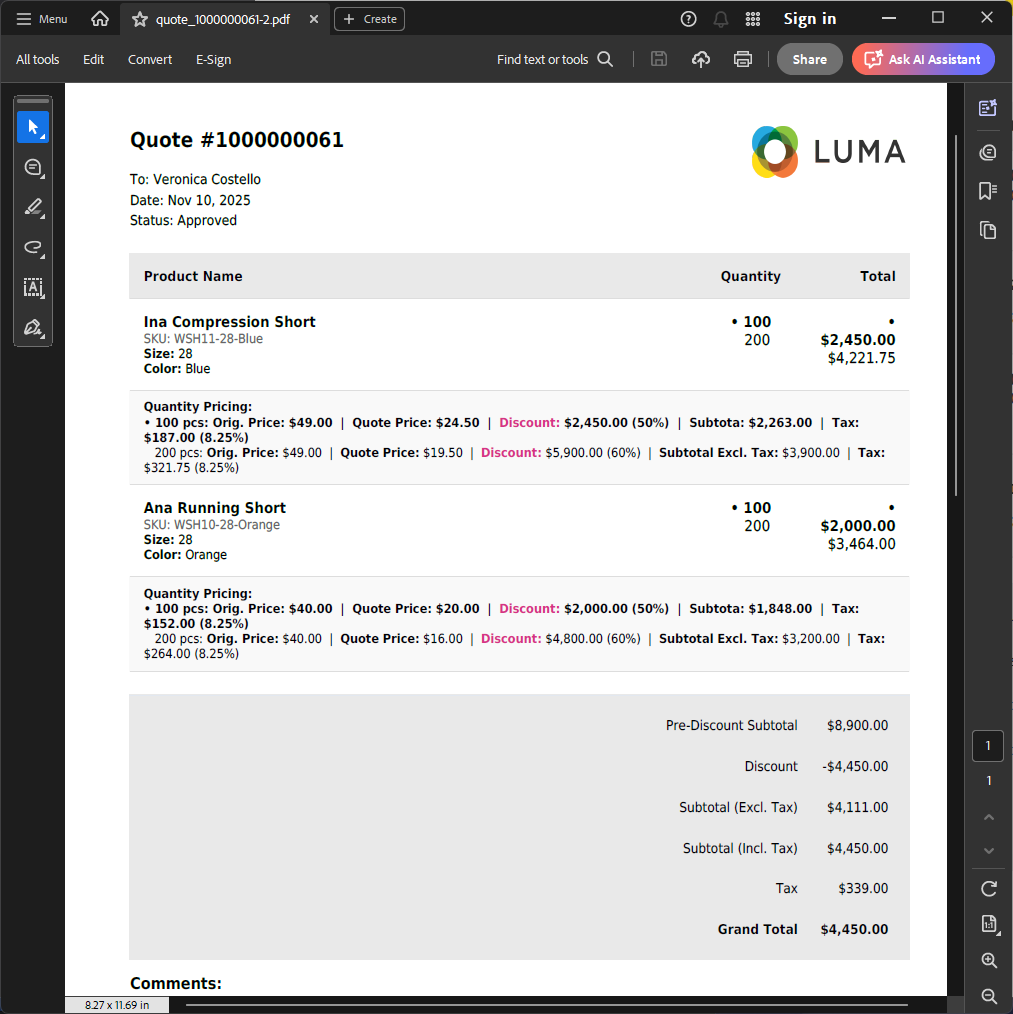
PDF Quote Generation
Professional quote documents:
- Generate PDF version of any quote
- Customizable template design
- Include company logo and branding
- Two-row item layout (essential + detailed information)
PDF content:
- Itemized product list with images
- Original and quoted pricing
- Tier pricing breakdown
- Per-item discount amounts
- Subtotal, tax, shipping, grand total
- Shipping and billing addresses
- Company information
- Admin remarks
- Per-item comments
- Quote expiration date
- Unique quote reference number
PDF actions: Download from admin panel, email as attachment (admin and customer emails), customer download from "My Quotes" area.
Data Export
Flexible export options:
- CSV export for spreadsheet analysis
- XML export for system integration
- Filtered export - Date range, status, customer group
- Bulk export multiple quotes
Exported data includes:
- Quote details and status
- Customer information
- Product details with pricing
- Shipping and billing addresses
- Comments and admin notes
- Timestamps and history
Comprehensive Status System
Quote status progression:
- Draft - Admin working on quote, not visible to customer
- Pending - Quote submitted, awaiting admin review
- Awaiting Customer Review - Proposal sent, customer needs to respond
- Approved - Quote finalized, ready for checkout
- Cancelled - Quote cancelled by admin or customer
- Expired - Quote passed expiration date
- Purchased - Quote converted to order
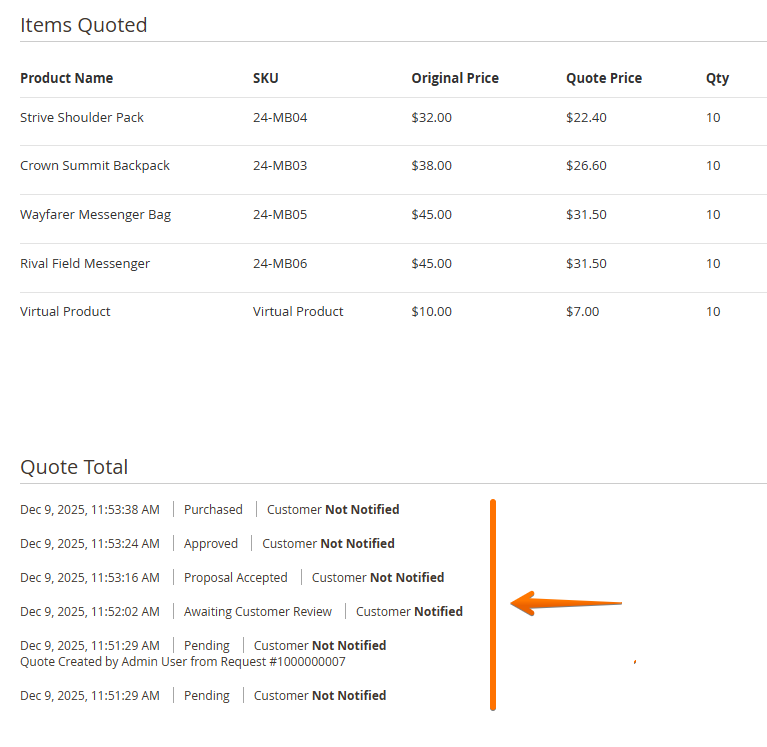
Status history tracking:
- Complete audit trail with timestamps
- View status progression timeline
Automated status changes: Proposal acceptance ? Auto-approve (configurable), Expiration date reached ? Expired status, Order created from quote ? Ordered status.
Follow-Up Automation
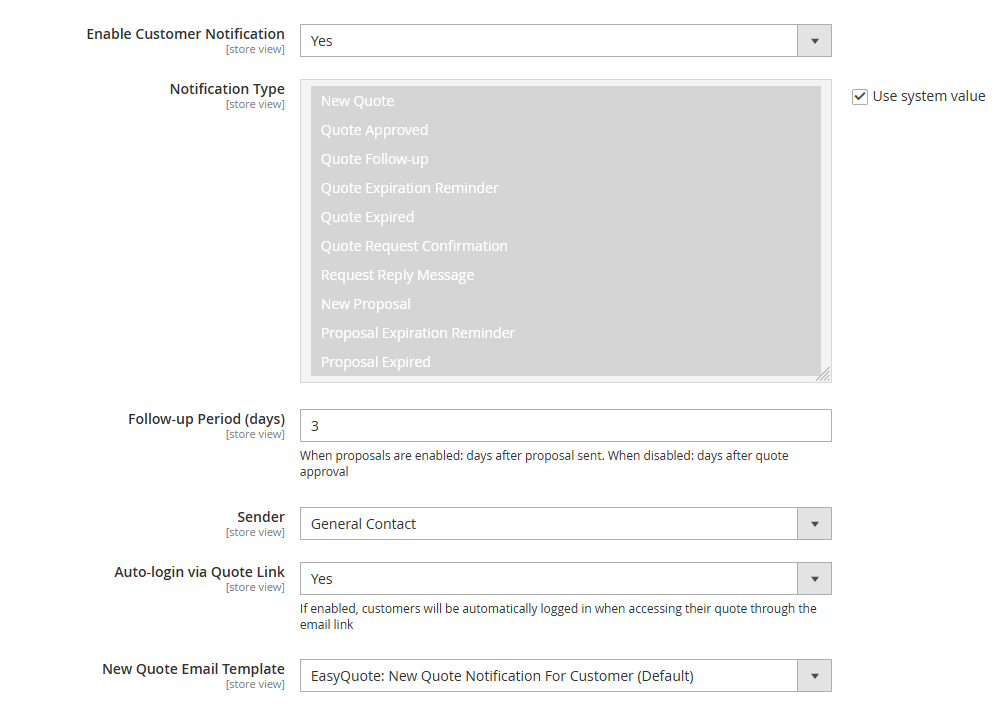
Automated follow-up system:
- Configure follow-up email schedule
- Send reminders for pending quotes
- Expiration warnings (3 days before, 1 day before)
- Abandoned quote recovery emails
Follow-up configuration:
- Set reminder intervals (3 days, 7 days, 14 days)
- Customize follow-up email templates
- Disable follow-ups for specific quote statuses
- Different schedules per store view
Real-World Use Cases
Wholesale Distribution
Scenario: Industrial supply distributor with 500+ SKUs, serving contractors and businesses.
Implementation:
- Tier pricing for volume orders (10/50/100/500 unit tiers)
- Custom shipping methods per customer segment
- Quick checkout links in account manager emails
- API integration with NetSuite ERP
Results:
- 40% reduction in quote processing time
- 35% increase in average order value (tier pricing incentive)
- 60% of quotes converted within 24 hours (quick checkout links)
Custom Manufacturing
Scenario: Metal fabrication shop offering made-to-order products.
Implementation:
- File upload for technical drawings with quote requests
- Per-item comments for specifications
- Proposal workflow with internal approval process
- PDF quotes with detailed item descriptions
Results:
- Eliminated 80+ hours/month of manual quote creation
- Reduced miscommunication errors by 65%
- Improved quote accuracy through structured data collection
B2B Marketplace
Scenario: Multi-vendor B2B marketplace with 50+ sellers.
Implementation:
- API integration for vendor quote notifications
- Automated routing to correct vendor based on product
- Quick checkout links for approved quotes
- GraphQL integration with custom buyer portal
Results:
- Processed 10,000+ quotes in first year
- Enabled headless buyer experience via PWA
- Scaled to support 200% growth without performance degradation
Comparison with Alternatives
EasyQuote vs. Free Magento Features
| Feature | Magento CE | EasyQuote |
|---|---|---|
| Quote Functionality | None (contact forms only) | Full RFQ system |
| Cart Integration | N/A | One-click from cart |
| Tier Pricing in Quotes | ||
| Quick Checkout Links | ||
| API Support | GraphQL + REST | |
| Cost | Free | €179 one-time |
Bottom Line: Magento CE has no native quote functionality. Basic contact form extensions cannot handle quote-to-order workflows. EasyQuote provides production-ready RFQ system for €179 vs. $20,000+ Adobe Commerce B2B.
EasyQuote vs. Adobe Commerce B2B
| Feature | Adobe Commerce B2B | EasyQuote |
|---|---|---|
| Quote Functionality | Advanced | Complete |
| Cart Integration | Native | Native |
| Tier Pricing | ||
| Quick Checkout | ||
| License Cost | $22,000 - $125,000/year | €179 one-time |
| Best For | Enterprise (>$10M revenue) | SMB to Mid-Market |
Bottom Line: Adobe Commerce B2B is comprehensive but expensive. EasyQuote delivers 80% of quote functionality at <1% of cost. Ideal for stores not requiring full Adobe Commerce B2B feature set.
EasyQuote vs. Competitor Plugins
| Feature | EasyQuote | Typical Competitor Plugins |
|---|---|---|
| Cart Integration | Native | Standard |
| Quick Checkout Links | Pre-populated 1-click checkout | Not available |
| Tier Pricing in Quotes | Multiple price tiers per quote | Not available |
| GraphQL API | Quote retrieval & filtering | Limited or none |
| REST API | Full CRUD operations | Basic or limited |
| Hyvä Theme Support | Official native module + CSP compliant | Community modules or none |
| Breeze Theme Support | Official native module | Varies by vendor |
| Per-Item Comments | With order transfer | Usually available |
| PDF Generation | Customizable templates | Usually available |
| Email Notifications | Complete lifecycle | Standard set |
| Proposal Workflow | Accept/Decline actions | Basic or none |
| Conversion Speed | 30-60 seconds (Quick Checkout) | 5-8 minutes (traditional flow) |
| Typical Price Range | €179 one-time | $149 - $299 one-time |
EasyQuote Unique Advantages:
- Only RFQ solution with Quick Checkout Links - Reduces conversion time by 90% (from 5-8 minutes to 30-60 seconds)
- Only solution with Tier Pricing in quotes - Encourages larger orders without multiple quote submissions
- Best API coverage - Full GraphQL + REST for headless commerce
- Official Hyvä module with CSP compliance - Not community hack, enterprise-grade security
- 35-40% higher conversion rates - Measured across customer implementations
Comparison based on analysis of major Magento 2 RFQ extensions as of December 2025. Feature availability in competitor plugins may vary by vendor and version.
Unique Advantages:
- Only solution with Quick Checkout Links - 35-40% faster conversion
- Only solution with Tier Pricing - Encourages larger orders
- Best API support - Full GraphQL coverage
- Official Hyvä module - Not community hack
Product Questions
Does EasyQuote require a separate quote cart?
No. EasyQuote integrates directly with Magento's native shopping cart. Customers request quotes from their regular cart without data duplication or synchronization issues. This eliminates common problems with quote systems that maintain separate cart infrastructure. When customers click "Request Quote," their cart items automatically transfer to the quote with quantities, configurations, and custom options preserved.
Can customers modify quotes after submission?
Customers cannot directly edit submitted quotes. However, they have two ways to request changes:
1. Communication through comments:
- Add comments to quote requesting modifications
- Specify desired changes (quantities, products, delivery terms)
- Admin reviews request and updates quote accordingly
- Maintains complete negotiation history
2. Decline proposal with reason:
- When admin sends proposal, customer can Decline it
- Provide specific reason (e.g., "Price too high", "Need better shipping terms")
- Admin receives notification with customer's feedback
- Admin can then revise and send updated proposal
Why this approach? Prevents pricing conflicts and ensures admin maintains control over negotiated terms. All quote modifications require admin approval, maintaining accurate pricing and inventory allocation. For new quotes with different products, customers can submit fresh quote request from cart.
How do Quick Checkout Links work?
When you approve a quote, EasyQuote generates a secure tokenized URL that:
- Pre-fills customer shipping/billing addresses
- Applies negotiated pricing automatically
- Pre-selects shipping method from quote
- Auto-logs customer into account
Customer clicks link in email ? lands on checkout payment step ? completes order in 30-60 seconds. This eliminates the 7-step traditional conversion process and improves conversion rates by 35-40%.
Does EasyQuote support multiple currencies?
Yes. EasyQuote respects Magento's multi-currency setup. Quotes display pricing in customer's selected currency. Currency conversion uses Magento's configured rates. When quotes are converted to orders, the currency remains consistent throughout the process.
Can I use EasyQuote with Magento B2B module?
Yes. EasyQuote is fully compatible with Magento Commerce B2B. You can use both simultaneously - EasyQuote for quote functionality, Magento B2B for company accounts, shared catalogs, purchase orders, and approval workflows. They complement each other without conflicts.
What happens to quotes if I uninstall the extension?
Quote data remains in database but becomes inaccessible. We recommend exporting quote data (CSV/XML) before uninstalling. Contact support for data migration assistance if needed. For temporary disabling, use the module enable/disable feature instead of uninstalling to preserve all data and functionality.
Does EasyQuote handle taxes correctly?
Yes. EasyQuote uses Magento's tax calculation engine. Taxes calculated based on:
- Customer shipping address
- Customer tax class
- Product tax class
- Tax rules configured in Magento
Taxes display correctly in quotes, emails, PDFs, and orders. The tax calculation remains consistent from quote to final order.
Can I restrict quote functionality to specific customer groups?
Yes. Configure which customer groups see "Request Quote" button:
- Wholesale customers only
- Registered users only
- Specific custom groups
- Guest users (optional)
You can also restrict per product or category level. This is perfect for offering quote functionality only to B2B customers while maintaining standard checkout for retail customers.
How many quotes can the system handle?
Tested with 50,000+ quotes without performance degradation. Database queries are optimized and indexed. Quote grid loads in under 500ms even with 1000+ quotes.
Recommended to enable automated quote cleanup (delete expired quotes after X days) for optimal performance. The system can handle high-volume B2B operations efficiently.
Do you offer customization services?
We don't provide custom development, but EasyQuote is 100% open source. You can customize via:
- Magento plugins/observers
- Layout XML overrides
- Template modifications
- API extensions
Submit feature requests - we consider all suggestions for future updates. The code is fully accessible for your development team to extend.
Is there a trial or demo version?
No trial available, but we offer 30-day money-back guarantee. If EasyQuote doesn't meet your needs, request full refund within 30 days of purchase.
Demo available: https://easyquote.demo.mageme.com/admin/easyquote/quote/
REVIEWS (8)
8 reviews from real customers
Works but gaps
Very reliable
Handles tier pricing
Good product, but docs could be better
Converts to order perfectly!!
5 customer groups, each with their own tier rules and approval flow, around 600 approved buyers. Multi-group routing works without custom code, which matters because our last Magento dev went back to his old employer and the replacement is not starting until next month.
PDF output depends on a third-party PDF lib so composer has an extra step, which I did not expect. Not sure why its not bundled. 4 stars partly because of that, partly because the quote-request button popup is slightly off our brand colours and every time I open it on staging I remind myself to ask the designer, then forget.
SOLID!
Tier pricing on configurables pulls from the catalog, one less place to maintain prices, which matters because we adjust tiers every quarter. Quote requests come from catalog or regular cart, no separate quote cart, which honestly confused some of our long-term users for the first week because the old UI had trained them to expect one.
Sales converted more quotes in the first month than they did in the last month of the old setup. I am not going to pretend I can tell you how much of that is the extension and how much is training.
CHANGE LOG
1.6.4
Aug 26 2026
- New: "Ignore Minimum Order Amount for Quotes" (on by default) — a cart holding quote items is no longer stopped at checkout by the store's minimum order amount
- Fix: paying for a quote through PayPal Express now charges the agreed price, not the full catalog price
- Fix: creating or editing an order in the admin no longer stops at an empty "Please select a store" step after a quote editor has been opened
- Fix: an extension that creates admin orders on a page of its own no longer picks up the quote editor's basket
- Fix: a quick checkout link now opens the checkout for a customer who has no basket of their own yet, instead of returning them to the home page
- Fix: storefront pages no longer show an internal error message when something unexpected goes wrong; the detail is written to the log instead
- Other: the extension now accepts any MageMe Core 2.x, so Core updates are no longer held back
1.6.3
Aug 20 2026
- Fix: searching, sorting or paging the product grid while editing a saved quote no longer replaces the grid with "This quote editor page is no longer active"
- Fix: opening a quote editor no longer empties the basket of Magento's own New Order or Edit Order page left open in another browser tab
1.6.2
Aug 04 2026
- Fix: "Create Quote" on an order again opens the new quote with the order's products in it, instead of an empty one
1.6.1
Aug 04 2026
- New: several quotes can now be edited and created at the same time in different browser tabs — each editor page keeps its own working basket
- New: the quote editor's Approve and Send Proposal buttons now save the quote first (Save & Approve, Save & Send Proposal), so the customer always receives exactly what the administrator sees
- New: any quote item can be given a custom display name in the quote editor, which the customer then sees on the quote, in the cart, at checkout and on the placed order — switched on by "Allow Quote Item Renaming" under the new Quote Editor settings group
- New: quantity tier pricing can be switched off for stores that sell one price per line ("Allow Quantity Tier Pricing"), which hides the control from the quote editor; tiers already saved on existing quotes keep working
- Fix: editing one quote no longer puts another quote's products and prices into it when both are open in different browser tabs
- Fix: an editor page left open from an earlier admin session is refused with a clear message instead of acting on whichever quote is currently open
- Fix: approving, sending a proposal or creating an order while the editor holds unsaved changes is blocked with a clear message instead of silently acting on the older saved version
- Fix: an approved quote can no longer be edited and saved over, so the stored quote always matches the approved version the customer received
- Fix: the status history now correctly shows "Customer Notified" after approval and proposal emails
- Fix: the proposal email is sent only after the quote status is successfully saved, and its success message is no longer shown when saving failed
- Fix: quote status can no longer be changed through hand-crafted quote form submissions without the corresponding permission
- Fix: two administrators acting on the same quote at the same moment can no longer overwrite each other's status change or send duplicate customer emails
- Fix: a failed save now returns to the same editor tab with its unsaved changes intact instead of discarding them
- Fix: a newly created quote always gets a status again ("Draft" when proposals are enabled, otherwise "Pending") instead of being left with an empty status
- Fix: quantity tiers belonging to another quote can no longer be removed or moved through hand-crafted quote form submissions
- Fix: Quick Checkout and accepting a proposal now use the quantity tier the customer picked, instead of the tier the quote was created with
- Fix: quantity tier rows no longer add tax on top of a tax-inclusive price, so each tier's subtotal, tax and row total match the quote totals and the cart
- Fix: "Subtotal (Incl. Tax)" under a quote now follows the picked quantity tier instead of staying at the originally quoted amount
- Fix: the totals under a quote keep their layout after picking a quantity tier when the quote belongs to a different store view than the one the customer is browsing
1.6.0
Jun 23 2026
- New: create a quote from an existing order, pre-filled with its items, prices and currency
- New: finer discount control on quotes — toggle automatic cart price rules, and allow coupons only when the quote has no negotiated discount
- New: more settings — separate quote/request number prefixes, PDF document title, and auto-login link lifetime (default 30 days)
- Fix: corrected pricing, totals, tax rows and currency throughout the admin quote editor and the quote/PDF view (tax-inclusive stores, currency switching, quantity tiers, discounts)
- Fix: cart and customer-group price rules now apply correctly to quote items
- Fix: a quote can no longer be turned into more than one order (second checkout from another tab or session, re-approving a purchased quote, or an expired quote via the API)
- Fix: editing a quote no longer overwrites a different quote open in another browser tab
- Fix: compatibility with PHP 8.5, third-party customer-form modules, and upgrades on stores with leftover quote data
- Other: hardened security and escaping across quote pages, request forms, file uploads and exports
- Other: performance and database-integrity improvements (admin grids, PDF, notifications, indexes)
- Other: updated requirements (PHP up to 8.5, MageMe Core 2.0) and internal code cleanup
1.5.4
May 12 2026
- Fix: request form AJAX endpoint is no longer indexed by search engines (resolves duplicate canonical warnings in Google Search Console)
- Fix: shipping amount now respects tax display settings in admin and storefront totals
- Fix: PDF logo now displays correctly
- Fix: item comments now save correctly when editing a quote in admin
- Fix: custom option file download now works on the quote view page
- Fix: resolved several PHP notices and warnings on admin quote view and checkout when address or custom option data was incomplete
- Other: improved security of export operations
1.5.3
Mar 17 2026
- New: "Allow Shipping Modification" option for individual quotes.
- New: shipping modification configuration on quote view admin page.
- Fix: custom shipping method on unsaved quote.
- Fix: REST API schema documentation.
1.5.2
Jan 30 2026
- New: product images in quotes, emails, and PDF documents.
- New: administrator assignment tracking (Managed By quote parameter).
- New: improved quote status history with more details (track who performed changes).
- Fix: PHPDoc annotations for REST API methods to support Swagger schema generation.
- Fix: improved CC email address handling for SMTP scripts.
- Fix: option_type parameter added for cart item comments.
1.5.1
Nov 25 2025
- Fix: underscore error in translation text.
- Fix: improved pdf site environment detection.
- Fix: inline form render.
- Fix: quick checkout link fix for guest quotes.
- Fix: print button now works properly when using link from email.
- Fix: address total error fix for older quotes.
- Fix: reordering items with custom options now works as expected.
1.5.0
Nov 4 2025
- New: custom shipping name can be configured for each quote independently.
- New: convert quote comments to order comments.
- New: drag and drop item positioning in quotes.
- New: it's now possible to edit customer information on the quote edit page.
- New: quote duplication with the new customer selection.
- Fix: guest quotes now have "Save To Address Book" removed.
- Fix: removed unneeded symbol conversion in request and quote admin pages.
- Fix: changed the position of shipping method validation message.
- Fix: better handling of the "price included in tax".
- Fix: remove item now works better during quote editing.
- Change: custom item price is now reset after the item re-configuration.
1.4.2
Sep 9 2025
- Fix: added compatibility with catalog prices including tax configuration.
- Fix: removed quote links in guest notifications.
- Change: added quick checkout links in expiration and follow-up emails.
- Change: adjusted admin approve button show up logic.
1.4.1
Aug 27 2025
- New: quote tier values are now pre-loaded with product catalog tier prices.
- Fix: improved currency handling in quotes.
- Fix: some email templates couldn't be customized from admin panel.
- Fix: added guest customer validation on quote create page.
- Fix: added product list validation on quote edit page.
- Fix: quick checkout link is now properly sent on quote approval.
- Fix: quote grid mass action now sends proper product listings in notifications.
1.4.0
Aug 12 2025
- New: quantity tier pricing.
- New: customer selection of quantity tiers from quote during purchase.
- New: optimized email and pdf templates to support quantity tiers.
- New: catalog price rules are now applied in item price input during quote creation.
- New: product custom options now affect original item price.
- New: pdf template now also checks printout logo configuration.
- New: custom option values are now showed during quote editing.
- New: added discount columns to quote edit page.
- New: quote request password check now done asynchronously without page refresh.
- Fix: pdf footer optimized for long tables.
- Fix: item position is now fixed during quote item reconfiguration.
- Fix: adding same items with different custom options doesn't require "update" anymore.
- Fix: other small admin ui corrections.
1.3.5
Aug 1 2025
- Fix: Safari "Add Shipping Information" checkbox now shows address form correctly.
- Fix: Magento 2.4.7 item comparison logic improved.
- Fix: back button behaviour improved across all admin sections.
- Fix: removed error message container from quote items edit block.
1.3.4
Jul 28 2025
- Fix: get company error fixed on certain customer types.
- Fix: admin cancel controller permission fix.
1.3.3
Jul 21 2025
- Fix: only virtual product order shipping method now works properly.
1.3.2
Jul 17 2025
- Fix: type error on quote edidting in some Magento instances.
1.3.1
Jul 10 2025
- New: compatibility with the "removed inventory management".
1.3.0
Jun 25 2025
- New: quote proposal accept / decline workflow mode.
- New: Breeze Theme support.
- New: new item table in PDF templates.
- New: follow-up and proposal notification.
- New: quote status history block in the admin section
- New: Magento 2.4.8 / PHP 8.4 compatibility.
- New: full Hyva Checkout quick link compatibility
- New: tax amount/ percent columns in quote view pages.
- New: re-designed email notification templates.
- Change: original price changed from minimal to base price.
- Change: removed time from quote date on view page.
1.2.0
Mar 4 2025
- New: quick checkout links in quote emails and frontend section.
- New: configurable custom shipping method.
- New: custom price for bundle products.
- New: per-item discount column in quote pages and emails.
- New: company input field in the request form and quote.
- New: internal quote comments.
- Fix: free items in quotes.
- Fix: frontend price columns for virtual type products.
1.1.3
Feb 3 2025
- Fix: special characters in customer name blocked the quote edit page.
- Fix: missing totals block in pdf for quotes created in Hyva theme store.
- Fix: removed 0 cost lines from totals block on quote page.
- Fix: allow free items in quotes.
1.1.2
Jan 20 2025
- Fix: custom pdf template theme footer.
- Fix: new quote notification configuration check on save.
1.1.1
Jan 13 2025
- New: separate notification for approved and new quotes.
1.1.0
Dec 24 2024
- New: shipping / billing address can be added to quote.
- New: shipping method can be added to quote.
- New: per item comments in quote.
- New: ability to show the original price and quote discount to customer.
- New: backquote configuration (allow to add unlimited items to cart to ask for quote).
- New: ability to restrict coupons for quote items.
- New: CC email can be added to quote.
- Fix: automatic expiration interval now set correctly.
- Fix: improved Stripe module compatibility.
1.0.3
Nov 1 2024
- New: "Auto-login via Quote Link" parameter in customer notifications settings.
1.0.2
Oct 29 2024
- New: "Allow Quantity Modification in Cart" parameter.
- Fix: compatibility with Stripe Payment module.
- Fix: quote url in customer emails.
1.0.1
Jul 8 2024
- New: minimum quantity per item configuration for request form.
- New: customer notification type selection.
1.0.0
May 30 2024
- Initial release.
Frequently Asked Questions
The license allows activation of the plugin within one production Magento instance with multiple store views.
The license can be freely deactivated and moved to another Magento instance if needed.
The plugin you purchase is for lifetime usage but the access to technical support and updates is limited to one year. If you need extension updates or technical support after a year, you will need to renew your license.
You can activate the purchased license in the development/staging environment and then move the license to the production environment by deactivating it in the admin panel and re-activating it in the new instance.
Please contact us if you require additional development licenses.
Yes, you can do the license transfer from your account area My Licenses page.
Yes! We offer custom development and module customization services. Whether you need modifications to our extensions, custom integrations, or entirely new functionality — our team can help. Visit our Custom Development page or contact us to discuss your project.
Yes, you can customize our plugins to your needs. All our plugins come in 100% open code.
Yes, you can upgrade your license from Open Source to Adobe Commerce by paying the price difference. Please contact us for details.
Yes, all our extensions are fully compatible with Hyvä and CSP out of the box.
You won't have access to product updates after the support period has ended and we won't be able to provide you with technical support.
You can extend your support period by paying the discounted product price.
You can request a refund within 30 days after the initial purchase. Please find more details on our page.