
Auto-Approve Withdrawal Requests in Magento 2
Auto-Approval decides routine withdrawal requests in Magento 2 without a person opening them. You write down the policy you already apply by hand, and a cron pass checks every pending request against it once a minute.
It automates the decision, not the payout. The credit memo it raises is always an offline one, and the order is never cancelled. It ships disabled and touches nothing until you both switch it on and activate a rule.
The withdrawal function itself is free. Auto-Approval is one of the seven add-ons in EU Withdrawal Pro — €249 for Community, €599 for Enterprise and Cloud. It acts on requests submitted through the withdrawal function; it does not replace your RMA or returns process.
Since the withdrawal function went live, declarations arrive through the storefront instead of your inbox, and most of them have the same shape. Somebody still opens each one, reads it, and clicks Approve.
That click is the part worth automating. Below is one policy end to end — the rules, what the dry run reported, and what happened to a request afterwards. Every screenshot is from our public demo store, which opens without a login, so you can walk the same screens yourself. It assumes the button is already live on your store; if you are still working out whether you need one, start with our guide to the Article 11a withdrawal function.
The rules: priority, conditions and actions
Rules run in priority order and the first match wins, so the exceptions go at the top and the general case at the bottom. The demo store runs four of them in that order: electronics are never decided automatically; an ordinary non-partial return above 30 and up to 60 is approved and a credit memo is raised; anything at or below 30 is approved without a memo; and a draft rule for large orders sits inactive until somebody switches it on. Anything that matches none of them is left where it was.
A rule itself has three parts: when it applies (conditions), where it applies (websites), and what to do — approve, approve and issue a credit memo, or send to staff. Conditions combine with ALL or ANY and nest one level.
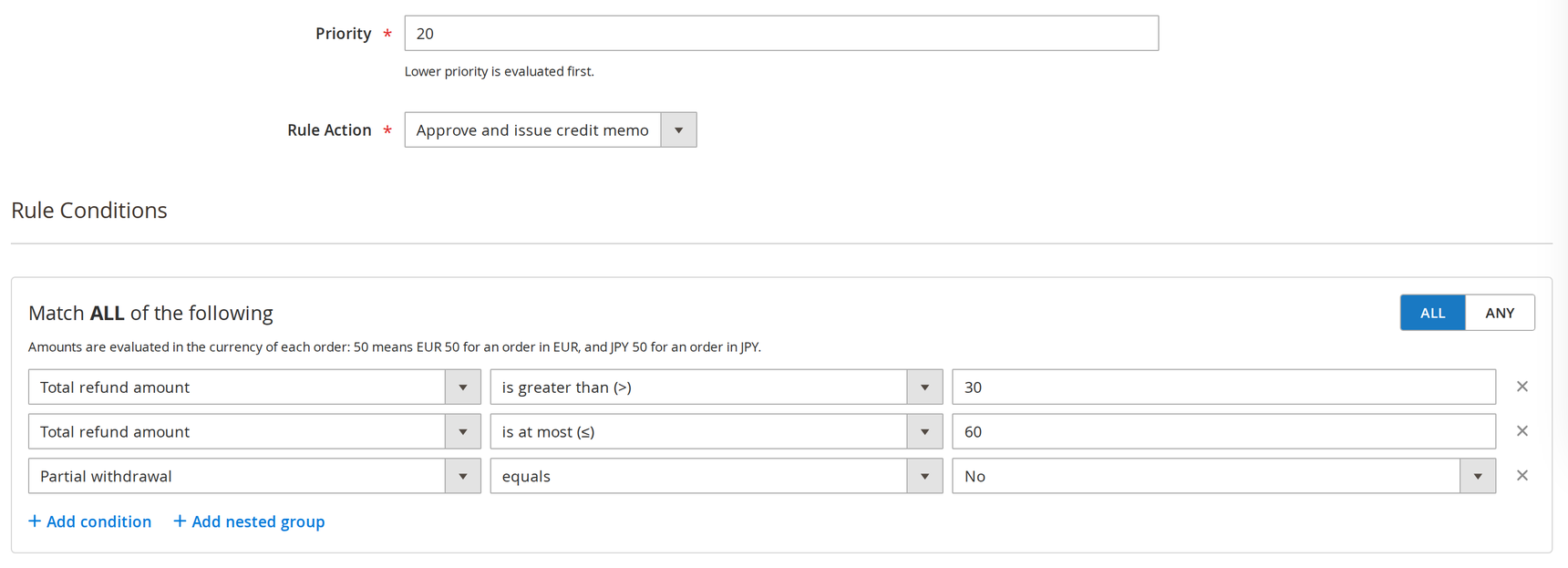
One rule: an amount range, a not-partial check, and the action to take. The demo names it “Auto-refund”, but what it raises is an offline credit memo, not a payment.
Conditions are built from the order and the request: amounts and percentages, line and quantity counts, customer group, order status, payment method, the withdrawal reason, product attributes and product categories. Each of them accepts only the operators that make sense for it, so a rule you can save is a rule the engine can evaluate.
One thing to watch in a multi-currency store: a threshold of 50 means 50 in each order’s own currency, with no conversion. That keeps a rule from breaking when you add a store view, but it also means the same rule is stricter in one currency than another.
What the dry run said before going live
Dry-Run does everything except the last step. The engine reads pending requests, matches them against your live rules, and records the decision it would have taken — without changing a request or creating a memo. Every entry lands in Auto-Approval History, where the Mode column separates a preview from a decision that actually ran.
The run below holds seven decisions. Five are previews: two would have been approved (one with a credit memo, one without), one would have gone to staff because it contained electronics, and two matched no rule at all. The remaining two are live: one routed to staff, and the bottom row, the only live decision that approved a request and issued a credit memo.
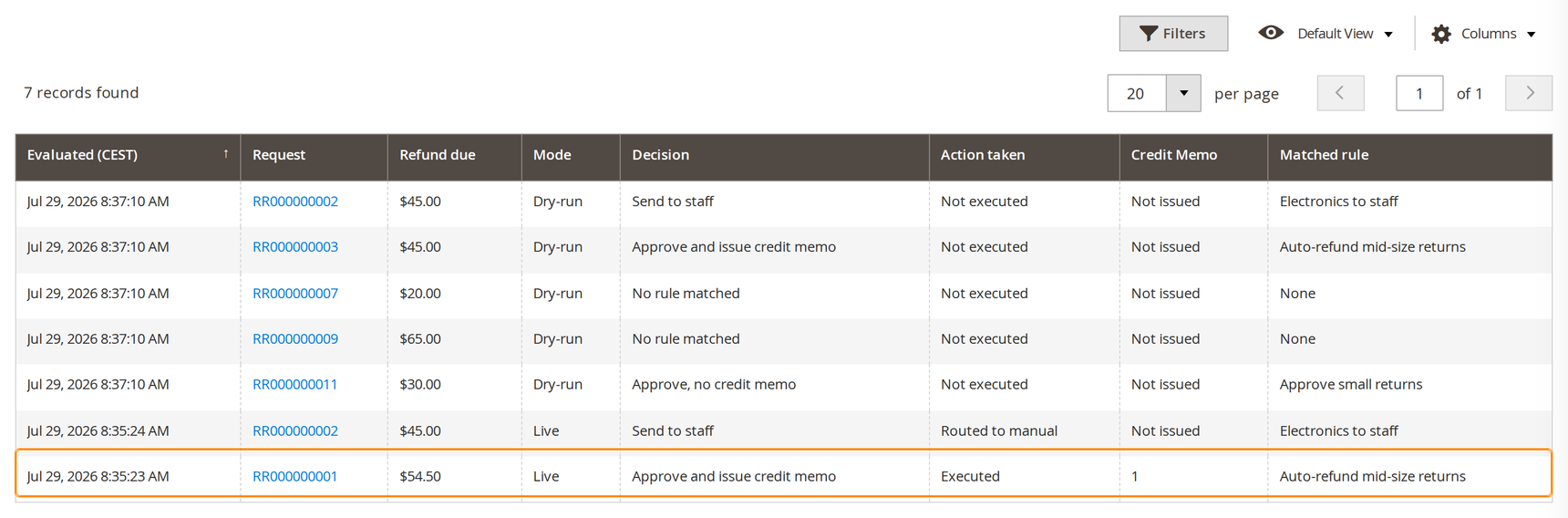
Highlighted: the live approval that issued a credit memo.
Three things end up in that grid, and they are not the same:
- A rule matched and acted. The row names the rule and the decision it produced.
- A rule matched and sent it to staff. The request stays pending, and the engine can email a recipient you nominate.
- Nothing matched, or the request was excluded before any rule ran. It stays pending with no email, and the row records the reason. Requests are excluded up front when they are no longer pending, when the order is on hold or flagged for fraud, when the store is not set to physical goods, or when the withdrawal receipt has not been confirmed as sent. No rule can override those.
Leave Dry-Run on until History shows a representative spread — including the ones that went to staff — and no failures. On a small queue that takes longer than a day, so judge it by the spread, not the calendar.
After approval: request status and the credit memo
With Dry-Run off, a matched request follows the path a staff member’s click would take. The status moves to approved, the customer receives the same approval email, and — if the rule says so — a credit memo is raised for the withdrawn items. The request page records why the status changed.
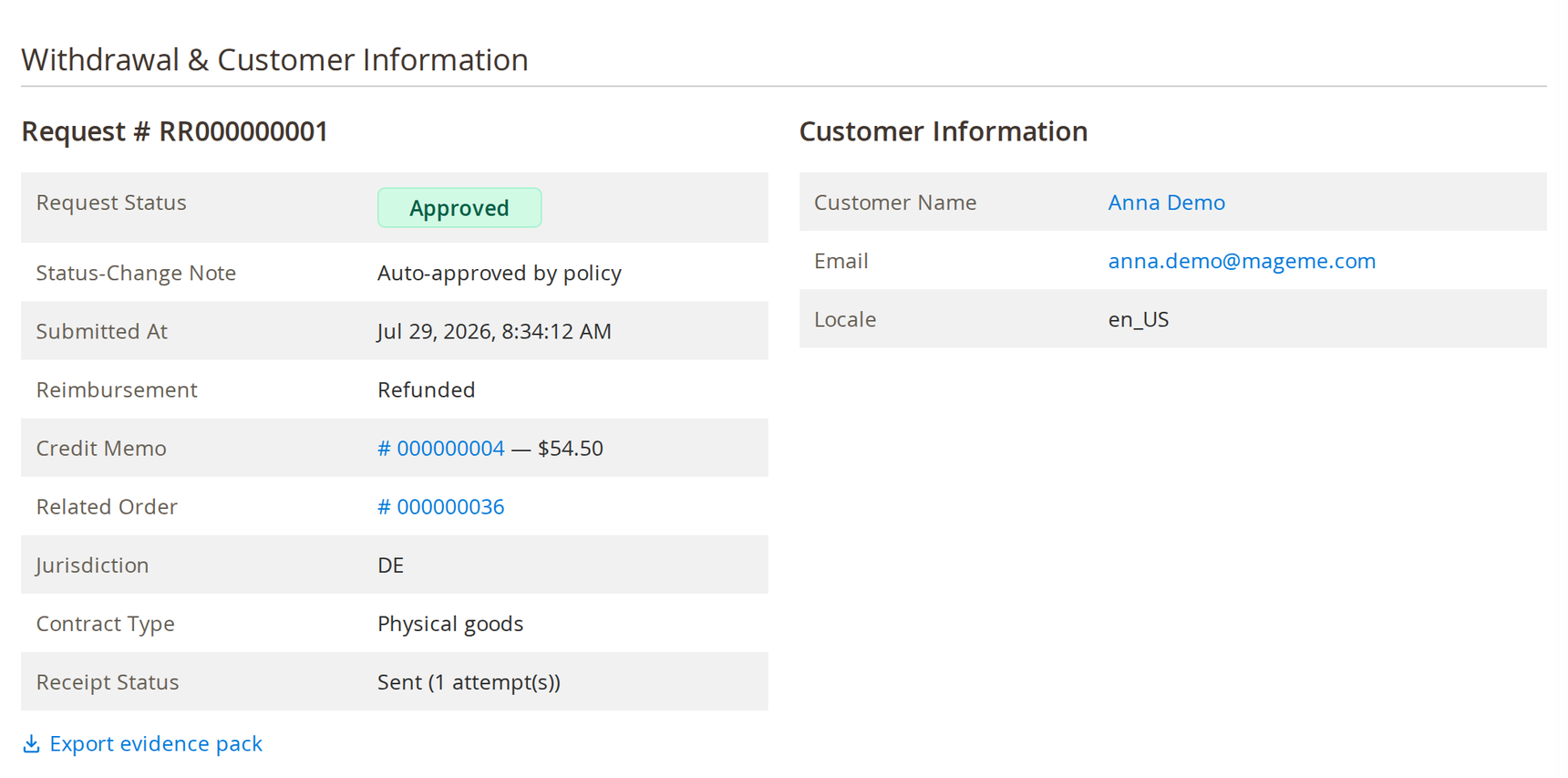
“Reimbursement: Refunded” on this screen means a credit memo is linked to the request, not that money has left your account.
The engine never cancels the order; the only thing it writes against the order is the credit memo the rule asked for. And it never acts on a request that matched no rule. Every automatic action is written to the same append-only, hash-chained audit log as your team’s manual ones, under the automation’s own actor rather than a user account.
Daily cap, error brake and permissions
Three settings bound what the engine can do while your rules are still new. They limit the volume and the damage, not the correctness of your policy: a rule that approves things it should not will keep doing so until you fix the rule, which is what Dry-Run is for.
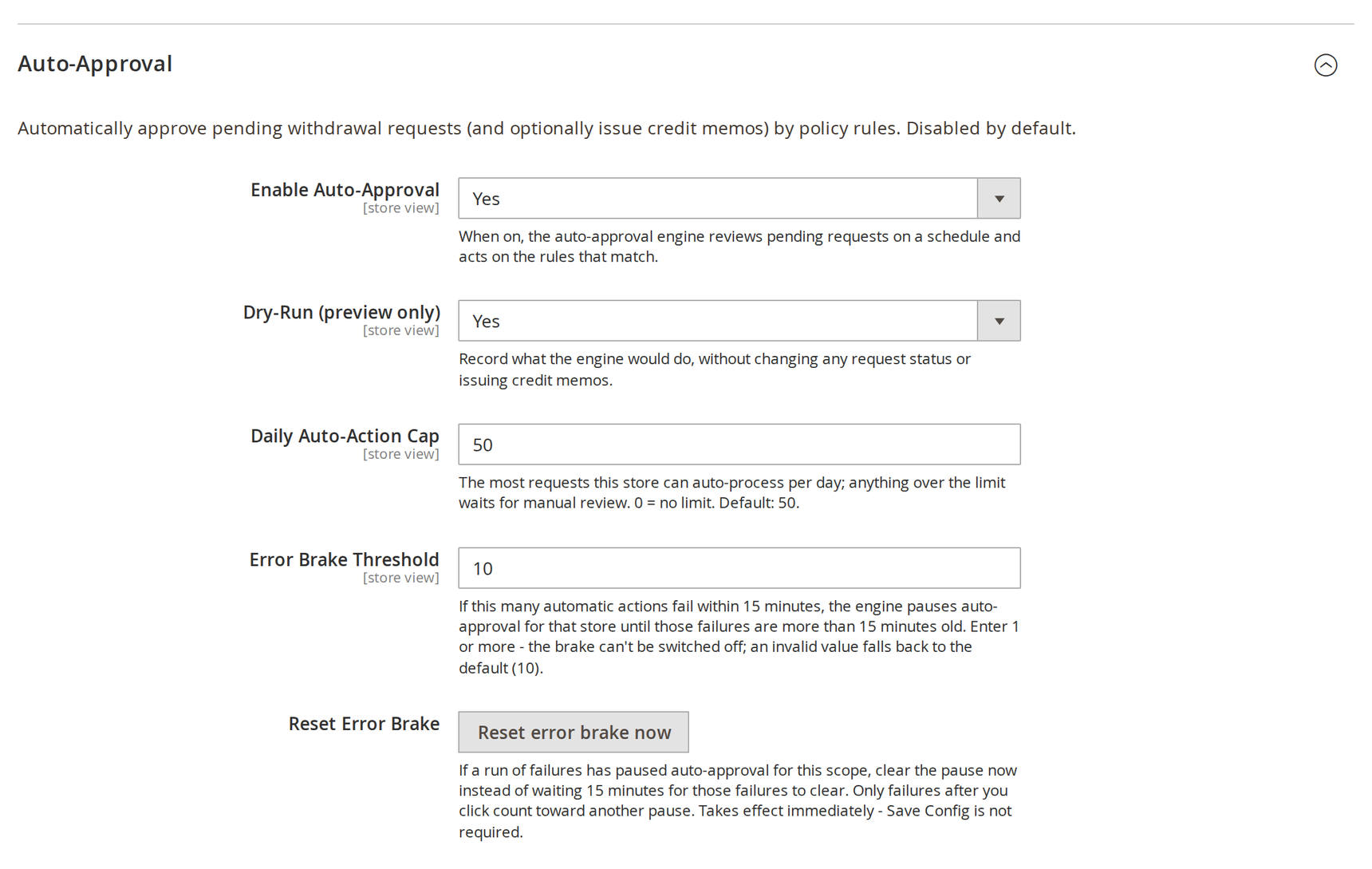
The settings that decide how far the engine may go before a person is needed.
The daily cap — 50 per store per day out of the box, or 0 for no limit — is the most requests the engine will auto-process in a day; the rest wait for your team. The error brake pauses the engine for a store after ten failed actions in fifteen minutes; it catches a misconfiguration that throws, not a rule that quietly approves the wrong thing, and you can clear it immediately with the reset button. The per-store enable switch stops everything at once.
Bringing a rule live is a separate permission from editing one, so a draft cannot reach production because somebody clicked Save. The field-by-field reference lives in the Auto-Approval documentation.
Key takeaways
- Write the exceptions first. Rules run in priority order and the first match wins, so the narrow “send to staff” rules belong above the broad approve rules.
- Approving is not refunding. The memo is always offline: a refund record, never a gateway transaction. The decision is automated; the payout stays in your finance process.
- Dry-Run is the whole engine minus the last step. It records what it would have done, on your real queue, without touching a request — and it is how you catch a wrong rule before it acts.
- The default is always the person. No matching rule, an order on hold or flagged for fraud, a receipt not yet confirmed sent — all of it stays pending for a human, and no rule can override those exclusions.
Frequently asked questions
EU Withdrawal Pro
Adds Auto-Approval. The withdrawal function stays free.