Best Magento 2 Custom Options Extensions Compared (2026 Updated)
Magento 2 custom options extensions let you add unlimited configurable fields (dropdowns, image swatches, file uploads, conditional logic, dependent options) to products without touching the core catalog structure. In this guide we compare the five most-used Magento 2 custom options extensions — MageMe Product Options (WebForms Suite), Amasty Custom Options, MageWorx Advanced Product Options, BSS Commerce Custom Options, and Mageplaza Product Attachment — across pricing, field types, conditional logic, and theme compatibility.
Magento 2’s built-in custom options are limited: a fixed set of field types, no conditional logic, no image swatches, no dependent options, and no way to attach forms or multi-step flows to a product. For any store selling configure-to-order goods — personalised gifts, custom furniture, print jobs, machinery, apparel with monograms — you need a third-party extension. B2B stores commonly pair a custom options extension with a quote-request workflow; for the bigger picture see our Best Magento 2 B2B extensions roundup and the Advanced Product Options product page for the Pro tier. This is an informational comparison of the five extensions that dominate this category in 2026, with a direct feature comparison and specific recommendations by use case. For a feature-by-feature deep dive into the MageMe-specific option builder, see our Product Options (WebForms Suite) product page.
What’s in this guide
- chevron_right Why the default Magento 2 custom options aren’t enough
- chevron_right 1. MageMe Product Options (WebForms Suite)
- chevron_right 2. Amasty Custom Options
- chevron_right 3. MageWorx Advanced Product Options
- chevron_right 4. BSS Commerce Custom Options
- chevron_right 5. Mageplaza Custom Options
- chevron_right Feature comparison table
- chevron_right How to choose: decision guide
- chevron_right Key takeaways
- chevron_right FAQ
Why the default Magento 2 custom options aren’t enough
Magento 2 ships with a “Customizable Options” tab on every product that supports Field, Area, File, Drop-down, Radio Buttons, Checkbox, Multiple Select, Date, Date & Time, and Time. That’s it. For a basic “add a gift message” use case it’s fine; for anything more sophisticated, you hit a wall fast:
No conditional logic
You can’t say “if the customer picks Engraving = Yes, show the Engraving Text field”. All options are always visible, which clutters the UI and confuses buyers.
No image swatches on options
Native options only display text and radio buttons. To show a colour picker with thumbnails or fabric swatches, you’d need a configurable product — but configurables don’t handle free-text, file upload, or non-variation customisation.
No dependent dropdowns
A dropdown’s values are fixed. You can’t filter them based on a previous selection (“if Country = UK, show only UK-compliant sizes”).
No templates or bulk reuse
Every product’s options are configured individually. If you have 500 products that share the same 10 options, you have to recreate them 500 times (or write a data migration).
All five extensions reviewed below solve at least three of these four limitations. Only one solves all four plus multi-step forms and popup configurators.
1. MageMe Product Options (WebForms Suite)
MageMe Product Options (WebForms Suite)
Price: €189 (Community) / €429 (Enterprise, Cloud) — one-time, includes 12 months of support and updates.
Best for: Stores that need configure-to-order flows beyond simple dropdowns — custom gifts, made-to-measure apparel, printed goods, engraved products, built-to-spec machinery.
MageMe’s extension is built on top of the company’s WebForms engine — which means any product can have a full WebForms-style configurator attached as its options form. This is a structurally different approach from the other four extensions, which treat custom options as an extended version of Magento’s native options UI.
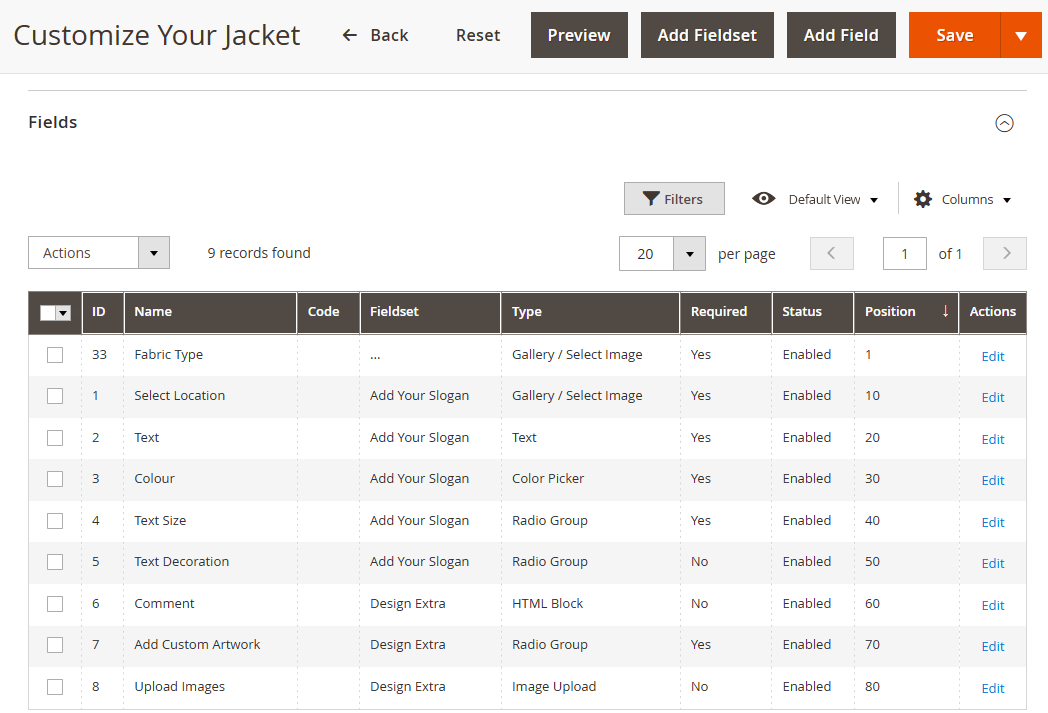
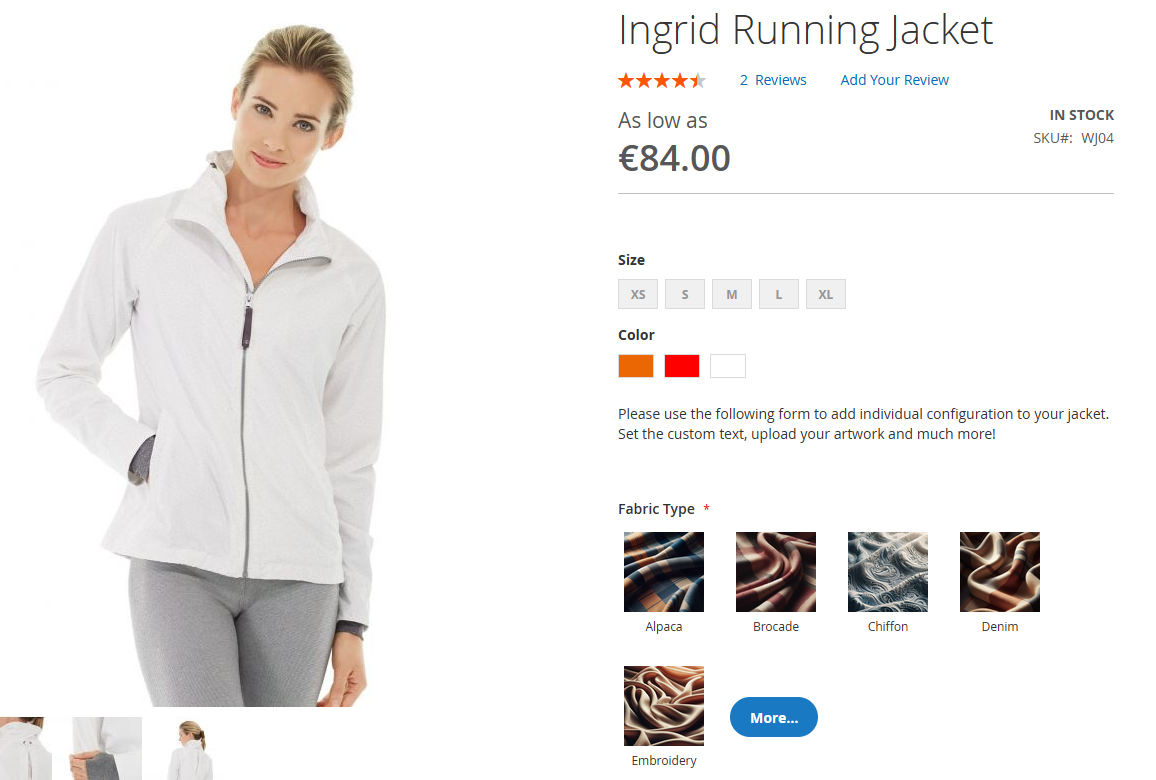
Key features:
- 30+ field types — including file upload, image with swatches, slider, WYSIWYG text, color picker, date/time, captcha, signature, Google Map, rating
- Conditional logic — show/hide fields, set values, or change pricing based on other field values
- Multi-step configurators — break complex products into wizard-style steps with progress bars and validation per step
- Popup options — open the configurator in a modal from the product page or cart
- Templates — create an options form once, attach it to unlimited products via rules or manual assignment
- Dynamic pricing — options affect price in real time (flat, percentage, per character, per file), fully SKU-aware
- Cart integration — option values appear in the cart, order, and email templates; files are attached to orders and downloadable from the admin
- Luma, Breeze, and Hyvä compatible — CSP-compliant scripts for Hyvä
Trade-offs: The form-builder architecture is more powerful but has a steeper learning curve than Amasty’s familiar dropdown grid. For stores with simple “pick a color” variations, a specialised variation-options extension may be faster to set up.
2. Amasty Custom Options
Amasty Custom Options Pro
Price: from $99 (Community Edition) — one-time, includes 3 months of support. Enterprise and Cloud editions extend support to 12 months.
Best for: Stores already invested in Amasty’s module suite that want classic option variations with image swatches, bulk templates, and dependent options at a low entry price.
Amasty’s extension stays close to Magento’s native options UI but layers on the features everyone wishes were built-in: templates, dependent options, absolute / percentage / fixed pricing, image swatches, tooltips, and SKU policies. It’s a solid choice if your team already runs other Amasty modules and wants a consistent admin experience.
Key features:
- Dependent dropdowns (show values in option B based on the choice in option A)
- Image and colour swatches on radio / dropdown fields
- Templates with bulk attach via product rules
- SKU policies (replace, concatenate, or append to parent SKU)
- Tier pricing per option value
- Tooltips and descriptions per option
Trade-offs: No multi-step forms, no popup configurators, no signature / drawing fields, and no form-builder style validation rules. Conditional logic is limited to dependent dropdowns, not general show/hide rules.
3. MageWorx Advanced Product Options
MageWorx Advanced Product Options Suite
Price: from $299 (Community) up to $799 (Cloud) — one-time, includes 6 months of support. Latest version v2.39.9 (February 2026) adds slider / range field types, a colour picker, and image swatches.
Best for: Stores that need advanced inventory control tied to option combinations (real per-variant stock, not just logical options), plus SKU policy and cost tracking.
MageWorx’s extension is one of the few that handles per-option inventory — if “Red / Large” goes out of stock, the option combination is disabled automatically on the frontend without needing a configurable product underneath. For stores running hybrid catalogues where some SKUs need inventory tracking but not full configurable complexity, this is unique.
Key features:
- Per-option inventory and out-of-stock disable
- Option templates with bulk assignment
- Absolute / percentage / fixed pricing per value
- Image swatches and tooltips
- Conditional display rules (basic)
- Cost tracking per option (for margin reports)
Trade-offs: Inventory tracking is powerful but adds complexity to stock management. The admin UI is less streamlined than Amasty’s, and the extension splits functionality across multiple sub-modules.
4. BSS Commerce Custom Options
BSS Commerce Custom Options Advanced
Price: $277 sale (regular $366) for the Advanced Custom Options Package — a four-module bundle (Dependence, Image, Price/Qty, Template). Includes 1 year of support.
Best for: Stores that want dependent dropdowns, image swatches, price/qty rules, and templates together rather than piecing them out of separate single-feature modules.
BSS Commerce is sold as a four-module package rather than a single module — the $277 price covers Dependence, Image, Price/Qty, and Template modules together. You get dependent dropdowns, image swatches, templates, and pricing overrides in one bundle. The feature set is comparable to Amasty, with a corresponding trade-off in polish, documentation, and support response time.
Key features:
- Dependent dropdowns
- Image and colour swatches
- Templates with bulk attach
- Tooltip and description per option
- Basic conditional display (show option B if option A has value X)
Trade-offs: Minimal documentation, no multi-step flows, no popup configurators, and occasional compatibility gaps with Hyvä themes. The cheapest entry point but also the least feature-complete.
5. Mageplaza Custom Options
Mageplaza Product Options
Price: from $249 (Community Edition) — one-time, 60-day money-back guarantee, supports Magento 2.4.4–2.4.8 and PHP 8.4.
Best for: Stores already running Mageplaza modules that want visual swatches, dependent options, templates, and grouped sections with a consistent UX.
Mageplaza’s entry is a solid mid-range option with group-based organisation, conditional logic, and price calculation rules. The main differentiator is the visual grouping on the frontend — options can be organised into collapsible sections for complex products.
Key features:
- Grouped options (collapsible sections on the frontend)
- Dependent dropdowns
- Image swatches
- Conditional price rules
- Template assignment
Trade-offs: No multi-step or popup configurators, no file upload on options, no advanced validation. The UX is cleaner than BSS Commerce but still not as configurable as MageMe or Amasty.
Feature comparison: 5 custom options extensions side by side
| Feature | MageMe Product Options |
Amasty | MageWorx | BSS | Mageplaza |
|---|---|---|---|---|---|
| Starting price | €189 | $99 | $299 | $277 | $249 |
| Number of field types | 30+ | 12 | 14 | 10 | 12 |
| Conditional logic (general show/hide) | ✓ | ✗ | limited | limited | ✓ |
| Dependent dropdowns | ✓ | ✓ | ✓ | ✓ | ✓ |
| Multi-step configurator | ✓ | ✗ | ✗ | ✗ | ✗ |
| Popup options modal | ✓ | ✗ | ✗ | ✗ | ✗ |
| Image / colour swatches | ✓ | ✓ | ✓ | ✓ | ✓ |
| File upload field | ✓ | ✓ | ✓ | — | — |
| Signature / drawing field | ✓ | ✗ | ✗ | ✗ | ✗ |
| Per-option inventory | — | — | ✓ | — | — |
| Templates / bulk attach | ✓ | ✓ | ✓ | ✓ | ✓ |
| Hyvä compatibility | ✓ | ✓ | ✓ | ✓ | ✓ |
| Breeze compatibility | ✓ | — | — | — | — |
| Support included | 12 months | 3 months | 6 months | 12 months | 12 months |
— = feature not advertised by vendor at the time of review. Always verify current capabilities on each vendor’s product page before purchase.
How to choose: a decision guide
The right extension depends less on feature count and more on what your products actually look like. Use this decision guide:
You need configure-to-order with logic and validation
Made-to-measure apparel, engraved gifts, printed products with specifications, custom machinery: pick MageMe Product Options (WebForms Suite). The conditional-logic engine and multi-step flow handle complex configurators natively.
You need classic dropdown variations with image swatches
Catalogue of products where each option is a simple dropdown (size, colour, finish) and you want Amasty’s familiar admin UX: pick Amasty Custom Options.
You need per-option inventory tracking
Stock is tracked at the option-combination level (Red+Large = 5 units) without using configurable products: pick MageWorx Advanced Product Options.
You have a tight budget and simple needs
Dependent dropdowns, image swatches, no multi-step, no Hyvä required: pick BSS Commerce Custom Options.
Key takeaways
- Magento’s default custom options are unusable for modern configure-to-order flows. Every serious store running custom-made or personalised products needs a third-party extension.
- Feature counts are misleading. Amasty has a smaller field catalogue but a more polished admin UX; MageMe has more field types but a steeper learning curve because of the form-builder architecture.
- Only MageMe covers multi-step configurators and popup options. If your product needs a wizard flow, that’s effectively a one-vendor market.
- Conditional logic is the biggest differentiator. Native show/hide rules (not just dependent dropdowns) dramatically change how configurators feel to the customer. MageMe and Mageplaza are the two that fully support it.
- Total cost of ownership includes support response. A $99 Community-edition extension with 48-hour support cycles and a 3-month window is not cheaper than a €189 extension that answers within hours during a 12-month support window.
Frequently asked questions
Magento 2 ships with “Customizable Options” natively — free, but limited to 10 field types with no conditional logic, templates, or dependent dropdowns. None of the paid extensions reviewed here have a free edition. The cheapest paid entry in 2026 is Amasty Custom Options Community Edition at $99.
Configurable products are built from multiple simple products (each colour/size has its own SKU and stock). Custom options are attached to a single product and change the rendering or pricing without creating separate SKUs. Use configurables when you need inventory per variant; use custom options when you need unlimited personalisation (engraving text, file upload, free-form notes) without multiplying SKUs.
All five extensions reviewed here — MageMe Product Options (WebForms Suite), Amasty Custom Options, MageWorx Advanced Product Options (v2.39.9), BSS Commerce Advanced Custom Options Package, and Mageplaza Product Options — list Hyvä compatibility on their 2026 product pages and support Magento 2.4.4–2.4.8 with PHP 8.4.
Yes, all five extensions support dynamic pricing: flat surcharge per value, percentage of base price, per-character pricing (e.g. €2 per engraved letter), per-file upload pricing, and conditional pricing rules. MageMe and Amasty are the most flexible; BSS and Mageplaza handle the common cases.
Yes. All four paid extensions support templates: build the options once, attach them to unlimited products via rules (by category, attribute, or manual selection). Magento’s native options don’t have this — you’d have to configure each product individually.
MageMe, Amasty, and MageWorx support file upload fields with configurable file types and size limits. BSS and Mageplaza don’t include file upload in the base edition. If you need customers to upload design files, drawings, logos, or specifications, pick one of the three that support it.
MageMe Product Options (WebForms Suite) is the clearest fit because it supports multi-step configurators, conditional logic, signature/drawing capture, and file uploads — all common requirements for built-to-order catalogues. The alternative is to combine Amasty custom options with a separate form builder, which ends up costing more and doubles the admin overhead.
Tried this guide? Share your experience!