How to Add hCaptcha to Magento 2 Forms
Last updated: April 24, 2026 · Tested on Magento 2.4.7 with Grasch_HCaptcha 1.3.0 and MageMe WebForms.
hCaptcha for Magento 2 is a privacy-friendly CAPTCHA that blocks bots without sending visitor data to Google — GDPR-compliant by design and free for up to 1M verifications/month. You can enable it globally on native Magento forms (admin login, customer login, contact, reviews, newsletter, checkout) using the free open-source Grasch_HCaptcha module, or switch the CAPTCHA provider on custom forms built with MageMe WebForms. This guide covers both paths.
Which path is right for you?
Option A · Free Grasch_HCaptcha module
Protect Magento’s native forms globally in 5 minutes. MIT-licensed, no fee.
- Admin login & forgot password
- Customer login, register, forgot
- Contact, product review, newsletter
- Checkout, coupon, send-to-friend
Option B · MageMe WebForms
hCaptcha on custom forms you build with WebForms — contact forms, surveys, multi-step wizards, file uploads.
- Custom-built WebForms forms
- Per-form on/off mode override
- Light/Dark theme, Normal/Compact size
- Hyva & Breeze compatible
Why Choose hCaptcha Over reCAPTCHA
Google reCAPTCHA is the most common CAPTCHA solution, but it sends visitor browsing data to Google for risk analysis. For stores operating under GDPR, CCPA, or other privacy regulations, this creates compliance concerns. hCaptcha solves this by keeping data processing minimal and transparent.
hCaptcha
- No visitor tracking or profiling
- GDPR & CCPA compliant by design
- Free tier: 1M requests/month
- Data processed in the US & EU
- Works without cookies
- Accessibility mode available
Google reCAPTCHA
- Collects browsing data for risk scoring
- Requires cookie consent under GDPR
- Free, but data is used by Google
- Data processed by Google globally
- Uses tracking cookies
- May require privacy policy updates
For EU-based stores or merchants selling to EU customers, hCaptcha eliminates the need for complex consent mechanisms that reCAPTCHA requires under GDPR regulations.
Option A — Free Grasch_HCaptcha Module
The open-source Grasch_HCaptcha module extends Magento’s built-in Magento_ReCaptcha framework and swaps the provider from reCAPTCHA to hCaptcha. This means hCaptcha automatically protects every form that Magento’s stock reCAPTCHA integration already covers — no code changes needed, no per-form configuration.
Grasch_HCaptcha
MIT · v1.3.0 · Magento 2.4.x · PHP 7.4+ · Composer: grasch/module-hcaptcha
A drop-in hCaptcha provider that plugs into Magento’s native reCAPTCHA extension points. Once installed and configured, it covers the following forms out of the box:
- Admin panel login & forgot password
- Customer login, register, forgot password
- Contact form
- Product review form
- Newsletter subscription
- Send-to-friend (wishlist)
- Checkout (guest & logged-in)
- Apply coupon code
- PayPal PayflowPro
- GraphQL & REST API validation
- Visible and invisible modes
- Per-form on/off toggles
Install via Composer
From your Magento 2 root directory:
composer require grasch/module-hcaptcha
bin/magento setup:upgrade
bin/magento setup:static-content:deploy
bin/magento cache:clean
If you run a production build, add bin/magento setup:di:compile between setup:upgrade and setup:static-content:deploy.
Configure in Admin
- Sign up at hcaptcha.com, add your domain, and copy the Site Key and Secret Key.
- In Magento Admin, open Stores → Configuration → Security → hCaptcha Storefront (the module adds a parallel hCaptcha Admin Panel section for backend forms).
- Paste your keys, pick Theme (Light/Dark) and Size (Normal/Compact), set the mode to Always on or Invisible, save, and flush cache.
Heads up. Grasch_HCaptcha is built on top of the native Magento_ReCaptcha* modules. They ship enabled in Magento 2.4.x, but if you’ve disabled any of them (for example Magento_ReCaptchaAdminUi), re-enable before installing — otherwise the module won’t wire itself into the admin login form. Verify with bin/magento module:status | grep ReCaptcha.
Option B — Set up hCaptcha in WebForms
If your forms are built with MageMe WebForms (contact forms, surveys, multi-step wizards, file-upload forms, quote requests), CAPTCHA is configured at the WebForms level — independently of the global Magento reCAPTCHA settings. Use this path when you want per-form on/off control or when your forms are custom WebForms rather than native Magento forms.
Step 1: Get Your hCaptcha Keys
- Go to hcaptcha.com and create a free account
- Add your site domain in the dashboard
- Copy your Site Key and Secret Key
Step 2: Configure WebForms
In Magento Admin, navigate to MageMe → WebForms → Settings.
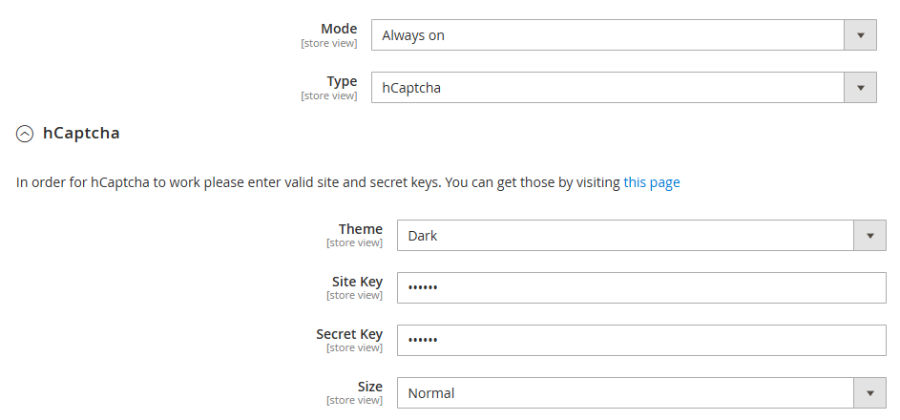
- Set CAPTCHA Mode to Always on or Auto (shows only to suspicious visitors)
- Select CAPTCHA Type as hCaptcha
- Paste your Site Key and Secret Key
- Choose Theme: Light or Dark (matches your store design)
- Select Size: Normal or Compact
- Save and flush cache
Step 3: Enable Per Form
Each form in WebForms inherits the global CAPTCHA settings. To override per form:
- Open the form in MageMe → WebForms → Manage Forms
- Go to the CAPTCHA tab
- Set Mode to override the global setting if needed
- Save the form
hCaptcha will now appear on the form frontend. Test by submitting the form to verify the challenge works correctly.
When to Use Each
| Situation | Recommended approach |
|---|---|
| Protect Magento admin login, customer login, contact, reviews, newsletter globally | hCaptcha via Grasch_HCaptcha (Option A) |
| Custom forms built in WebForms (quotes, surveys, file uploads) | hCaptcha via WebForms (Option B) |
| Need both native form coverage AND custom form coverage | Install both — they don’t conflict (different config paths) |
| EU store, GDPR-first | hCaptcha (either path) or Cloudflare Turnstile |
| Already using Cloudflare CDN | Cloudflare Turnstile (zero added latency) |
| Maximum bot protection with risk scoring | reCAPTCHA Enterprise (paid) + honeypot |
| Invisible challenge (no user interaction) | Cloudflare Turnstile or reCAPTCHA v3 |
WebForms supports hCaptcha, reCAPTCHA, and Turnstile as switchable providers on the forms you build — see the full Magento 2 Spam Protection Guide for a side-by-side of all options.
Common Issues & Troubleshooting
- Grasch module throws “Magento_ReCaptcha* is disabled”. Re-enable the framework:
bin/magento module:enable Magento_ReCaptchaUi Magento_ReCaptchaAdminUi Magento_ReCaptchaFrontendUi, thensetup:upgrade. - hCaptcha widget not rendering on admin login. Clear
pub/staticandvar/view_preprocessed, thenbin/magento setup:static-content:deploy -f --area adminhtml. - WebForms form still shows reCAPTCHA after switching to hCaptcha. Flush
full_pageandblock_htmlcaches and hard-reload; the rendered widget script is cached per form. - Hyva or Breeze theme: widget missing. Both themes load scripts via custom loaders; if a minifier or JS bundler defers the hCaptcha script, initialisation can fail. Disable JS merging under Stores → Configuration → Advanced → Developer and re-test — if the widget appears, exclude the hCaptcha script from your minifier’s bundle list.
- Approaching the 1M/month limit. Unlikely for most stores, but monitor in the hCaptcha dashboard; if you hit it, switch the mode to Auto so only suspicious visitors see a challenge.
Key Takeaways
- Privacy-first protection — hCaptcha doesn’t track visitors or share data with ad networks, making it ideal for GDPR/CCPA compliance.
- Free for most stores — the free tier covers 1 million verifications per month, enough for virtually any Magento store.
- 3-minute setup — get your keys from hcaptcha.com, paste them into the module config or WebForms settings, done.
- Two paths, pick the right one — use Grasch_HCaptcha for Magento’s native forms (admin, customer, contact, reviews, newsletter, checkout), and WebForms for custom forms you build yourself. They complement each other.
- No vendor lock-in — both paths let you switch to reCAPTCHA, Turnstile, or back to hCaptcha without touching form structure.
Frequently Asked Questions
Yes. hCaptcha offers a free tier that includes up to 1 million verifications per month. Most Magento stores never exceed this limit. Paid plans add features like custom branding and priority support, but the free tier is fully functional for spam protection.
Yes. Both the Grasch_HCaptcha module and WebForms render hCaptcha using standard JavaScript that is compatible with Hyva and Breeze (Luma-based) themes. The widget loads asynchronously and does not conflict with Alpine.js or Breeze JS frameworks.
Yes. The MIT-licensed Grasch_HCaptcha module on GitHub (composer package grasch/module-hcaptcha) adds hCaptcha as a provider on top of Magento’s built-in reCAPTCHA framework. Once installed, hCaptcha protects the admin login, customer login/register/forgot, contact, product reviews, newsletter, send-to-friend, checkout, and coupon forms. Install is a single composer require followed by setup:upgrade. It’s the simplest way to get hCaptcha coverage across all native Magento forms at zero cost.
WebForms uses a global CAPTCHA type setting that applies to all forms. You cannot mix different CAPTCHA providers on different forms simultaneously. However, you can control which forms show CAPTCHA and which do not using per-form CAPTCHA mode settings.
hCaptcha is designed with privacy as a core principle. It does not use tracking cookies, does not build visitor profiles, and processes minimal data required for bot detection. hCaptcha’s GDPR page details their compliance approach. Many EU-focused stores prefer hCaptcha over reCAPTCHA specifically for this reason.
Both are privacy-friendly alternatives to reCAPTCHA. Cloudflare Turnstile is invisible (no user interaction required) and integrates seamlessly if you already use Cloudflare CDN. hCaptcha shows a visual challenge but offers a free tier with generous limits. Choose Turnstile for seamless UX, hCaptcha for maximum independence from any single provider.
They cover different surfaces. Grasch_HCaptcha swaps the CAPTCHA provider on Magento’s native forms (admin, customer, contact, review, checkout). WebForms lets you build custom forms — quote requests, multi-step wizards, file uploads, surveys, popup forms — and gives you per-form CAPTCHA control on those. If you only need to protect stock Magento forms, the free module is enough. If you build custom forms too, the two modules run side by side without conflict.
No. The hCaptcha script loads asynchronously and only activates on pages with forms. It adds approximately 30-50KB to the page weight, comparable to reCAPTCHA. Both Grasch_HCaptcha and WebForms load the script only when a form with CAPTCHA enabled is present on the page.
Using WebForms? Share Your Experience!