
EasyQuote 1.5: Advanced Quote Management for Magento 2
EasyQuote 1.5 adds advanced workflow features to the Magento 2 quote management extension — including automated status transitions, configurable approval workflows, enhanced email notifications with per-status templates, and improved admin UX for managing large quote volumes. This update makes EasyQuote suitable for enterprise B2B environments with complex approval chains. Compatible with Magento 2.4.4+ on Luma, Breeze, and Hyvä.
Managing B2B quotes efficiently requires tools that adapt to real-world workflows. Version 1.5 focuses on eliminating repetitive tasks and streamlining quote operations with features requested directly by our user community. These updates target the most time-consuming aspects of quote management: handling similar quotes, correcting customer information, organizing quote items, and maintaining context through the quote-to-order lifecycle.
format_list_bulleted Table of Contents
Smart Quote Duplication
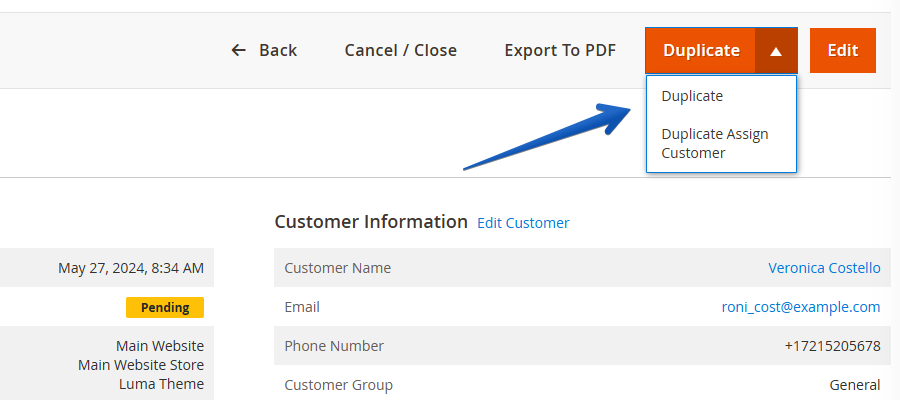
Duplicate existing quotes for the same customer or create template-based quotes for new customers. When duplicating for a different customer, the system automatically clears original customer data, shipping addresses, billing information, and delivery methods while preserving product configurations and pricing structures. This approach is similar to how Adobe Commerce B2B quote templates work, but available on Magento Open Source.
verifiedKey Benefits
Reduce quote creation time from 15 minutes to under 2 minutes
Maintain pricing structures and product configurations
Smart data cleanup for new customer quotes
Perfect for recurring orders and quote templates
play_circleHow to Use
- Open any existing quote from the admin panel
- Click duplicate button and select "Same Customer" or "Assign Customer"
- System creates copy with appropriate data retention - edit and send as needed
Customer Information Editing
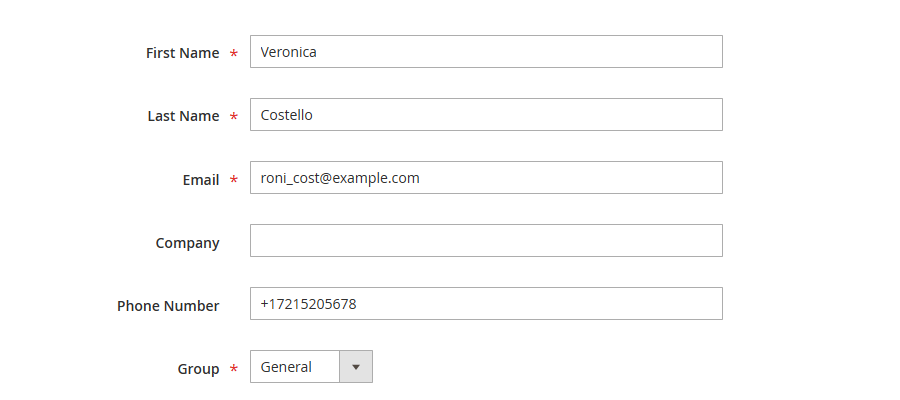
Modify customer details directly on the quote edit page without recreating the entire quote. Previously locked after quote creation, customer information can now be updated at any stage, accommodating contact changes, organizational restructures, or initial data entry errors.
verifiedKey Benefits
Modify customer data throughout the entire quote lifecycle
Handle contact changes without losing quote history
Fix data entry mistakes without starting over
Adapt to organizational changes seamlessly
play_circleHow to Use
- Navigate to quote edit page and locate customer information section
- Click edit button (now available at all quote stages)
- Modify required fields - quote remains intact with all history preserved
Drag-and-Drop Item Ordering
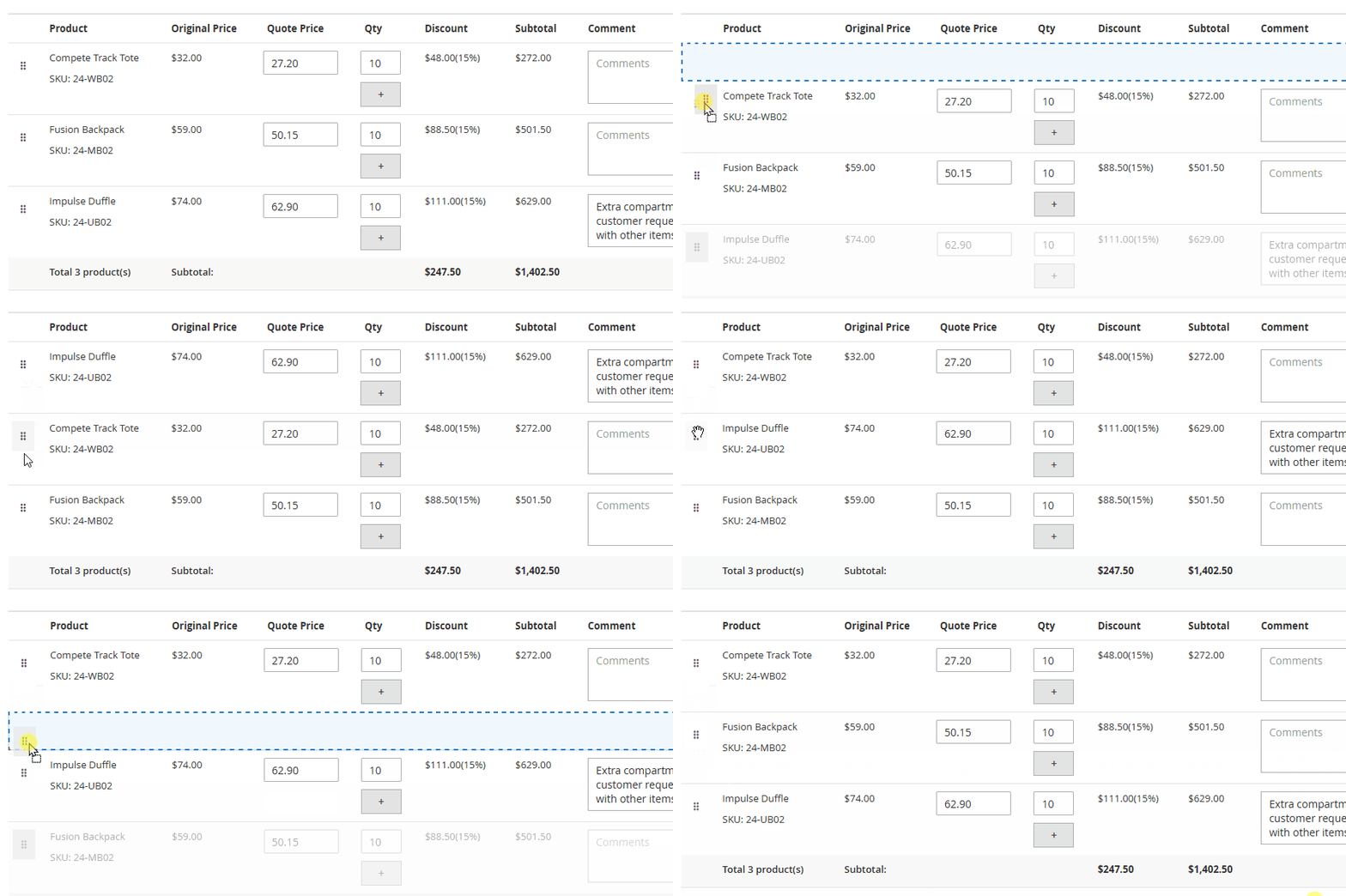
Reorganize quote items through direct mouse interaction. Item sequence is preserved across PDF exports, customer quote views, and internal management interfaces. This addresses the need to present products in logical groupings or priority order.
verifiedKey Benefits
Visual organization with simple drag-and-drop
Group related products for better presentation
Order persists across PDF, customer view, and admin panel
Automatic ordering without manual item numbering
play_circleHow to Use
- On quote edit page, hover over any quote item
- Click and hold drag handle, move item to desired position
- Release to set new order - changes save automatically
Per-Quote Custom Shipping Names
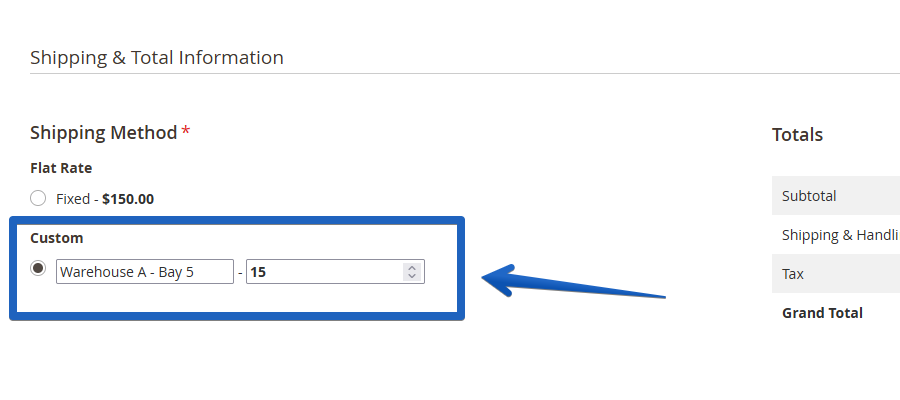
Configure custom shipping method names for individual quotes rather than relying on global settings. This enables specific delivery terminology for different clients, projects, or shipping arrangements. Custom names persist through checkout, order confirmation, and invoice generation.
verifiedKey Benefits
Use terminology familiar to each customer
Customize delivery method names by project
Names appear throughout checkout, order, and invoice
Override global settings for specific quotes
play_circleHow to Use
- In quote shipping configuration section, enable custom shipping if needed
- Enter specific name for this quote (e.g., "Warehouse A - Loading Dock")
- Name automatically appears in customer checkout, order confirmation, and invoice
business_centerCommon Use Cases
warehouseMulti-Location
"Warehouse A - Bay 5"
"Warehouse B - Dock 2"
scheduleTime-Specific
"After Hours Delivery"
"Morning Slot Only"
assignmentProject-Based
"Project Alpha - Site B"
"Construction Phase 2"
Real-World Applications
Discover how version 1.5 features solve real business challenges in B2B quote management:
Recurring Customer Orders
Challenge: A manufacturing client orders similar custom configurations monthly with minor quantity adjustments.
Solution: Duplicate last month's approved quote, adjust quantities and delivery dates, send for approval. Quote creation time reduced from 15 minutes to under 2 minutes while maintaining accuracy.
Account Transitions
Challenge: Primary contact leaves client organization during active quote negotiations; new purchasing manager needs to take over.
Solution: Edit customer information directly on existing quotes without disrupting negotiation history, pricing discussions, or recreating quotes from scratch. All previous communication remains intact.
Multi-Location Client Operations
Challenge: Enterprise client operates multiple warehouses, each requiring different delivery instructions and shipping arrangements.
Solution: Customize shipping method names per quote: "Warehouse A - Loading Dock Access", "Warehouse B - Ground Level Only", "Warehouse C - After Hours Delivery". Terms appear consistently across customer checkout, order confirmation, and all invoices.
Complex Product Presentations
Challenge: Quote contains 50+ items from different categories that need logical organization for client review and internal processing.
Solution: Drag items into strategic groups: core equipment first, related accessories second, optional upgrades last, maintenance supplies final. Organized structure is maintained in PDF exports and customer portal view for clear communication.
Consolidated Department Orders
Challenge: Client approves three separate quotes from different departments (IT, Operations, Facilities) and purchases them together in one transaction.
Solution: All quote discussion threads automatically transfer to single order with clear attribution: "[Quote #1234 - IT]", "[Quote #1235 - Operations]", "[Quote #1236 - Facilities]". Fulfillment team has complete negotiation context without manual research.
Upgrade to 1.5
The 1.5 update is available now for all EasyQuote license holders. Access the latest version through your account dashboard. These features activate automatically upon installation - no configuration required to start using quote duplication, customer editing, or drag-and-drop ordering.
Related Features
Explore other EasyQuote capabilities that complement workflow efficiency
Quick Checkout Links
One-click conversion from quote approval to completed checkout with pre-populated data
Tier Pricing System
Volume-based pricing with multiple quantity tiers in single quotes
Complete Shipping Integration
Full address, method, and cost handling with automatic order conversion
Key Takeaways
- Automated status workflows — configure automatic transitions between quote statuses based on triggers like expiration, customer response, or payment.
- Per-status email templates — send different notification emails at each stage of the quote lifecycle.
- Improved admin grid — enhanced filtering, bulk actions, and quick-edit capabilities for managing high quote volumes.
- Approval chain support — multi-level approval workflows for enterprise environments with manager sign-off requirements.
- Direct checkout from quote — customers can proceed to checkout directly from an approved quote with negotiated pricing applied.
Frequently Asked Questions
Yes. EasyQuote 1.5 offers two duplication modes: "Same Customer" retains all original data, while "Assign Customer" clears personal data (shipping address, billing info, delivery method) and lets you assign the duplicated quote to a new customer. Product configurations and pricing structures are preserved in both modes.
Yes. Starting with version 1.5, customer information can be edited directly on the quote edit page at any stage of the quote lifecycle. All negotiation history, pricing, and product configurations remain intact when customer details are updated.
Yes. The item sequence you set via drag-and-drop is preserved across all outputs: the admin panel, customer-facing quote view, and PDF exports. There is no need to manually number items — the system maintains your custom order automatically.
You can set a custom shipping method name on each individual quote, overriding the global shipping method label. The custom name appears consistently throughout the checkout process, order confirmation email, and invoice. This is useful for multi-location clients who need delivery-specific terminology like "Warehouse A — Loading Dock" or "After Hours Delivery".
Yes. All comments from the quote negotiation thread are automatically appended to the resulting order as order comments. When multiple quotes are purchased together, each comment is labeled with its source quote number (e.g., "[Quote #1234]") so fulfillment teams can trace context back to the original negotiation.
Yes. Version 1.5 is available at no additional cost for all EasyQuote license holders with an active support and updates plan. All five new features activate automatically upon installation — no extra configuration is required. Update via Composer from the MageMe repository.
Using EasyQuote? Share Your Experience!








Quote Comments Transfer to Orders
Automatically transfer quote discussion threads to order comments during conversion. When multiple quotes convert to a single order, comments are consolidated with clear attribution to their source quote, preserving negotiation context for fulfillment teams. This is especially valuable in B2B environments where quote negotiation workflows involve multiple stakeholders.
verifiedKey Benefits
Full negotiation history transferred to orders
Quote source clearly labeled in multi-quote orders
Fulfillment teams have complete context
No manual comment copying required
settingsHow It Works