How to Add a Quote Request Form to Your Magento 2 Cart Page
The Cart Quote Request add-on is a free module for MageMe WebForms 3 that adds a “Get Quote” button to the Magento 2 cart page. When a customer clicks it, a popup form opens. On submission, the full cart contents — product names, SKUs, quantities, and configurable options — are captured automatically alongside the form data. It works with Luma, Breeze, and Hyvä themes on Magento 2.4.4+ / PHP 8.1+.
Your customer has spent time choosing products, adding items to the cart, configuring options — and now they need a price quote before they can submit a purchase order. In standard Magento, there is no way to request a quote directly from the cart page. The customer has to leave, find a contact form, and manually list everything they need. Most don't bother.
The Cart Quote Request add-on for WebForms 3 solves this by placing a "Get Quote" button right on the cart page. One click opens a popup form. On submission, the full cart contents — product names, SKUs, quantities, configurable options — are captured automatically alongside the form data. No copy-pasting, no lost context.
format_list_bulleted Table of Contents
- chevron_right Why Your Store Needs a Cart Quote Request Form
- chevron_right How the Cart Quote Request Add-on Works
- chevron_right Features at a Glance
- chevron_right CartQuote vs EasyQuote: Which Solution Is Right for You? (CSP & Hyva compatible)
- chevron_right Installation Guide
- chevron_right See It in Action
- chevron_right Combine with Other Free Add-ons
- chevron_right Frequently Asked Questions
Why Your Magento Store Needs a Cart Quote Request Form
Magento Commerce (Adobe Commerce) includes a built-in quote negotiation system for B2B buyers — but Magento Open Source has nothing. If you're running the community edition, your customers have no native way to request a quote for the items already in their cart.
This is a significant gap. Cart-level quoting is different from product-level "call for price" buttons or standalone RFQ forms. The customer has already done the work — selected products, chosen options, set quantities. A cart quote request preserves that context and turns it into a structured inquiry your sales team can act on immediately.
Here are the most common scenarios where a cart-level quote request form makes a real difference:
Wholesale and Bulk Orders
Buyers ordering in large quantities expect volume discounts that aren't listed on the storefront. A cart quote lets them submit their full order for custom pricing without calling or emailing product lists manually.
Configurable and Custom Products
When the final price depends on options the customer has selected — material, size, finish, add-ons — the cart captures those exact configurations. Your team quotes based on what the customer actually wants, not a generic product page.
Project-Based Purchasing
Construction, industrial supply, and event planning buyers often assemble complex multi-product orders. They need a single quote for the entire project, not individual product prices.
Negotiated Pricing Contracts
Enterprise and government buyers often have pre-negotiated rates that aren't reflected on the website. A cart quote request lets them submit orders under their existing contract terms.
International and Export Orders
Cross-border shipments require separate quoting for duties, taxes, and freight. Customers want to know the total landed cost before committing to a purchase order.
Mixed Cart Inquiries
When a cart contains items from different categories or suppliers, customers may want a bundled price for everything. Cart-level quoting gives your sales team the full picture in one request.
If any of these scenarios apply to your store, you need a way for customers to submit quote requests directly from the cart. That's exactly what the Cart Quote Request add-on provides — and it works with any Magento 2 store running WebForms 3.
How the Cart Quote Request Add-on Works
The add-on integrates seamlessly with your existing WebForms setup. Here is the complete flow from the customer's perspective to the admin's dashboard:
1 Customer browses and fills the cart
The customer shops as usual — adds products, selects configurable options, adjusts quantities. Nothing changes about the shopping experience.
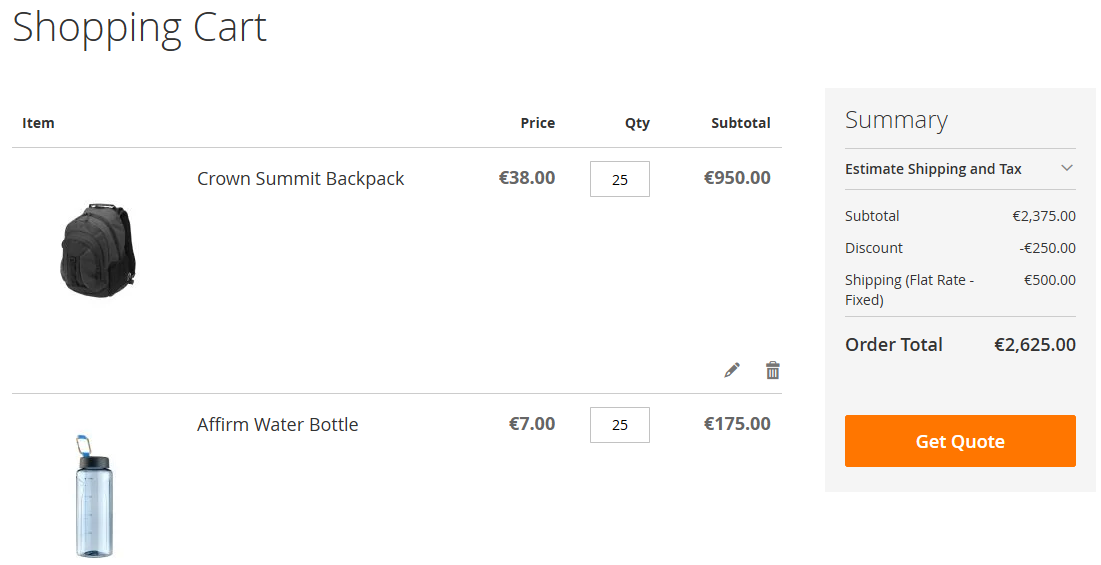
2 "Get Quote" button appears on the cart page
A configurable button is injected into the cart summary area. You control the button text, CSS class, and exact placement via a CSS selector — all from the admin panel, per store view.
3 Popup form opens with any WebForm
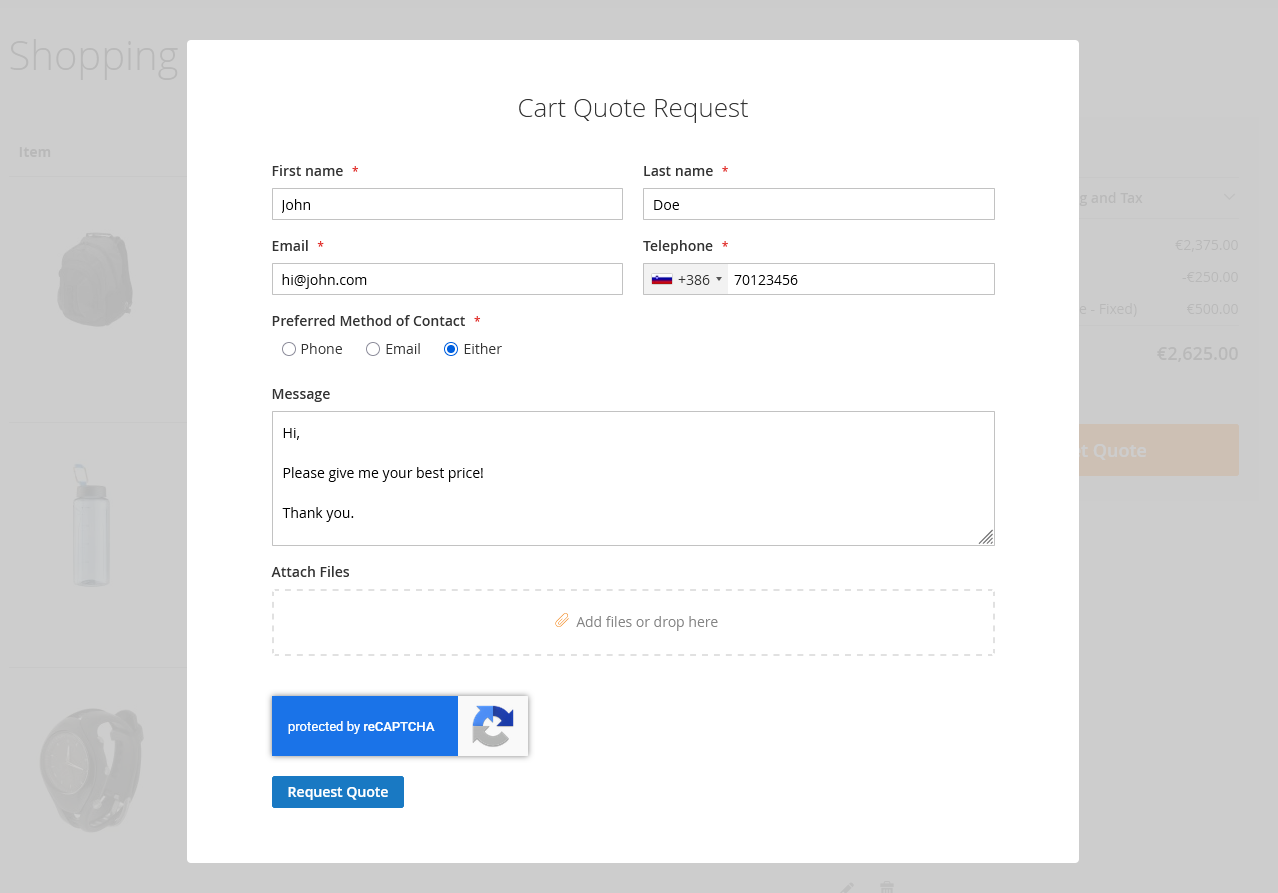
Clicking the button opens a modal with an AJAX-loaded WebForms form. This is a full-featured form — you can use any field types, conditional logic, file uploads, multi-step layouts. Design the quote request form exactly the way you need it.
4 Cart contents are captured automatically
When the customer submits the form, the add-on captures the full cart contents behind the scenes: product name, SKU, quantity, and all configurable product options. This data is serialized and stored alongside the form submission — no extra fields needed.
5 Admin receives the complete quote request
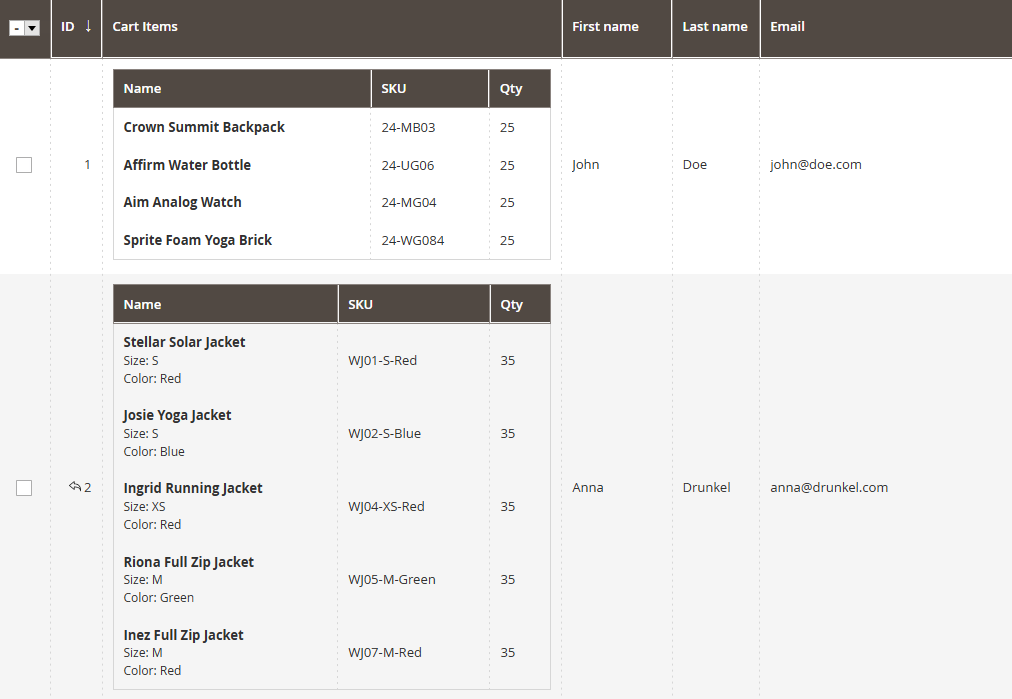
The admin notification email includes both the custom form fields (company name, message, contact info) and a formatted product table with all cart items. In the admin panel, the results grid has a dedicated "Products" column with full CSV export support.
Features at a Glance
Custom button text, CSS class, and placement via CSS selector. All settings are per store view — run different labels for different storefronts.
The modal loads any WebForms form via AJAX. Conditional logic, file uploads, multi-step layouts — everything works inside the popup.
Product name, SKU, quantity, and configurable product options — all captured automatically on every submission without extra form fields.
Show the button to everyone, logged-in customers only, or specific customer groups. Set a minimum quantity per item threshold to filter out small orders.
Dedicated "Products" column in the results grid. Filter, sort, and export quote requests with full cart contents to CSV or Excel.
Cart contents are included in both admin and customer notification emails via the {{var cartquote_products}} template variable.
Attach cart contents to any form — feedback, support tickets, save-for-later requests. Configure additional forms to capture cart data independently of the quote button.
A separate compatibility module provides native Hyva support with vanilla JS and Tingle modal — no RequireJS or KnockoutJS dependencies.
CartQuote vs EasyQuote: Which Solution Is Right for You? (CSP & Hyva compatible)
MageMe offers two products that handle quote requests in Magento 2. They serve different needs and can work together, but it's important to choose the right tool for your workflow.
WebForms CartQuote
Free Add-on- Lightweight, form-based approach
- Uses the full WebForms form builder
- Captures cart contents on form submission
- Admin views results in WebForms grid
- You handle the quoting workflow manually (email, phone, etc.)
- No quote lifecycle management
Best for: Stores that need simple quote requests, already use WebForms, and process quotes manually or through external tools.
EasyQuote
Full B2B Extension- Complete quote lifecycle: request, negotiate, approve, convert to order
- Admin pricing tools with line-item editing
- Tier pricing and custom shipping rates
- Branded PDF proposals
- Customer quote dashboard in My Account
- Quote-to-order conversion in one click
Best for: High-volume B2B operations that need automated quote management, negotiation workflows, and advanced proposal features.
Installation Guide
Requirements
Step-by-Step Installation
Step 1 Install the add-on via Composer
composer require mageme/module-webforms-3-cartquote
php bin/magento module:enable MageMe_WebFormsCartQuote
php bin/magento setup:upgrade
php bin/magento cache:flush
Step 2 Hyva users — install the compatibility module
composer require mageme/module-webforms-3-cartquote-hyva
php bin/magento module:enable Hyva_MageMeWebFormsCartQuote
php bin/magento setup:upgrade && php bin/magento cache:flush
Skip this step if you're not using the Hyva theme. The base module works with Luma, Breeze, and other standard Magento themes.
Step 3 Configure in the admin panel
- Navigate to Stores → Configuration → MageMe → WebForms → Cart Quote Request Add-on
- Enable the add-on and select the form to display in the popup
- Set visibility rules: who sees the button and the minimum quantity threshold
- Customize button text, popup title, and CSS classes
- Save and flush cache
See It in Action
Try the Cart Quote Request add-on on our live demo store. Add a few products to the cart and click the "Get Quote" button to see the full flow:
Combine with Other Free WebForms Add-ons
Cart Quote Request is one of several free add-ons available with WebForms 3. Together, they create a powerful form management ecosystem:
Zapier Integration
Automatically send quote requests to your CRM, Slack, Google Sheets, or 2,000+ other apps.
Learn morePrint to PDF
Generate professional PDF documents from quote request submissions — ready to email or archive.
Learn moreReference Number
Assign unique tracking numbers to every quote request for professional follow-up and audit trails.
Learn moreAll these add-ons are included at no extra cost with WebForms Suite — the complete form builder solution for Magento 2.
Get Started with Cart Quote RequestIncluded free with WebForms Suite. Install from the MageMe Composer repository with an active support plan. composer require mageme/module-webforms-3-cartquote
explore View WebForms Suite play_circle Try the Demo |
Key Takeaways
- Magento Open Source has no native cart quoting — Adobe Commerce includes B2B quote negotiation, but the community edition does not.
- Cart Quote Request is a free add-on for WebForms 3 that adds a “Get Quote” button directly on the cart page.
- Full cart contents are captured automatically — product names, SKUs, quantities, and configurable options are stored with every form submission.
- Works with Luma, Breeze, and Hyvä — a separate compatibility module provides native Hyvä support.
- Not a replacement for EasyQuote — CartQuote handles simple quote capture; EasyQuote provides full lifecycle management with negotiation and quote-to-order conversion.
Frequently Asked Questions
No. Cart Quote Request requires WebForms 3. If you're using version 2, you'll need to upgrade to version 3 to access this and other add-ons.
Yes. It's included at no additional cost for all WebForms 3 users with an active support and updates plan. Install it via Composer from the MageMe repository.
Product name, SKU, quantity, and all configurable product options. The data is serialized as JSON and stored in a dedicated database column alongside the form result.
Yes. Button text, CSS class, popup title, and placement (via CSS selector) are all configurable per store view in the admin panel under Stores → Configuration → MageMe → WebForms → Cart Quote Request Add-on.
Yes. Install the separate compatibility module (mageme/module-webforms-3-cartquote-hyva) which provides native Hyva support with vanilla JavaScript and the Tingle modal library.
Yes. The visibility settings let you show the button to all visitors, logged-in customers only, or specific customer groups. You can also set a minimum quantity per item threshold.
Nothing — the cart remains unchanged. The customer can continue shopping, modify quantities, or proceed to checkout independently of the quote request.
CartQuote captures quote requests via a form and stores them as WebForms results — you handle the quoting process manually. EasyQuote is a full B2B quote extension with lifecycle management, negotiation, pricing tools, and quote-to-order conversion. See the comparison section above for details.
Using Cart Quote Request? Share Your Experience!