
How to Hide Prices in Magento 2: Free Extension Guide
Hiding prices in Magento 2 means replacing the price and “Add to Cart” button with a quote-request form, login prompt, or customer-group rule — without editing templates or disabling products. With MageMe HidePrice you can hide prices for guests, by customer group, by category, or site-wide, and capture quote requests through a built-in form. Compatible with Magento 2.4.4+ on Luma, Breeze, and Hyvä themes.
Many Magento 2 stores — especially B2B merchants, wholesalers, and dealers — don’t want every visitor to see their prices. Some need login-gated pricing, some need to hide prices from guests only, and others want to replace prices entirely with a “Request a Quote” form. Out of the box, Magento 2 has no UI for any of this: you’d have to remove products from categories, edit .phtml templates, or disable the cart globally.
This guide walks through four practical strategies for hiding prices in Magento 2, shows you how to install and configure the MageMe HidePrice extension step by step, and explains when to combine it with WebForms or EasyQuote for full quote workflows. For the HidePrice 3.0 feature overview (built-in quote forms, CSP compliance, admin reporting), see our HidePrice 3.0 release notes.
What’s in this guide
- chevron_right Why hide prices in Magento 2
- chevron_right Four strategies for hiding prices
- chevron_right Install HidePrice via Composer
- chevron_right Configure hide-price rules
- chevron_right Replace price with a Request Price button
- chevron_right Combine with WebForms for custom inquiry forms
- chevron_right Upgrade to EasyQuote for full RFQ workflows
- chevron_right Other Hide Price extensions for Magento 2
- chevron_right Key takeaways
- chevron_right FAQ
Why hide prices in Magento 2
Hiding prices isn’t just about B2B pricing secrecy. Merchants hide prices in Magento 2 for five very different reasons, and each one calls for a different configuration:
1. B2B wholesale pricing
You have different price lists for retail, wholesale, and dealer customers. Guests should not see negotiated prices, and retail visitors should not see wholesale tiers.
2. Dealer / reseller catalog
You sell through resellers and can’t publish MAP-restricted prices online. A “Request a Quote” button replaces the price and routes inquiries to your sales team.
3. Configure-to-order products
Custom machinery, furniture, or print jobs where the price depends on specifications. A fixed price makes no sense — the customer needs to describe what they want first.
4. Login-to-see-price catalogs
You want to collect account registrations in exchange for pricing access — common for trade shops, professional supplies, and exclusive dealer networks.
The fifth reason is simply compliance: some categories (alcohol, prescription products, regulated goods) legally require age or license verification before showing prices in certain regions.
Four strategies for hiding prices in Magento 2
Before you install anything, decide which of these four patterns fits your store. HidePrice supports all four, but the configuration differs.
Hide for guests only
Logged-out visitors see “Login to view price”; logged-in customers see normal prices. Simplest setup, good for trade shops that already gate accounts.
HidePrice rule: Customer Group → NOT LOGGED IN → Hide
Hide by customer group
Retail guests see retail prices, wholesalers see wholesale tiers, dealers see dealer pricing. Prices are never globally hidden — they’re conditional.
HidePrice rule: Multiple rules, one per group
Hide by category or product
Most of the catalog shows prices, but certain categories (e.g. “Custom Builds”) or individual SKUs hide them. Ideal for mixed retail-plus-quote stores.
HidePrice rule: Scope → Category IDs / Product IDs
Replace price with a form
Instead of hiding the price, replace it with a “Request a Quote” button that opens an inline form. The visitor submits contact info; you reply with a custom price.
HidePrice rule: Hide + Replace with CTA + Form
Strategies 1–3 are covered by the free edition of HidePrice. Strategy 4 (inline quote form) requires HidePrice Pro or a combination of HidePrice free with WebForms.
Install HidePrice via Composer
HidePrice installs like any standard Magento 2 module, via Composer. You’ll need SSH access to your Magento root and the Composer authentication keys from your MageMe account (for the paid edition; the free edition is on packagist).
Add the package
From your Magento 2 root directory:
composer require mageme/module-hideprice-proFor the free edition, replace mageme/module-hideprice-pro with mageme/module-hideprice.
Enable the module and run setup
bin/magento module:enable Mageme_HidePrice
bin/magento setup:upgrade
bin/magento setup:di:compile
bin/magento setup:static-content:deploy -fFlush the cache
bin/magento cache:flushAfter the cache flush you should see the HidePrice section in Stores → Configuration → MageMe in the Magento admin.
Configure hide-price rules in the admin
HidePrice uses a rule-based engine modeled on Magento’s cart price rules: you create one or more rules, each with conditions (who) and actions (what to hide). Rules are evaluated in priority order, and the first match wins.
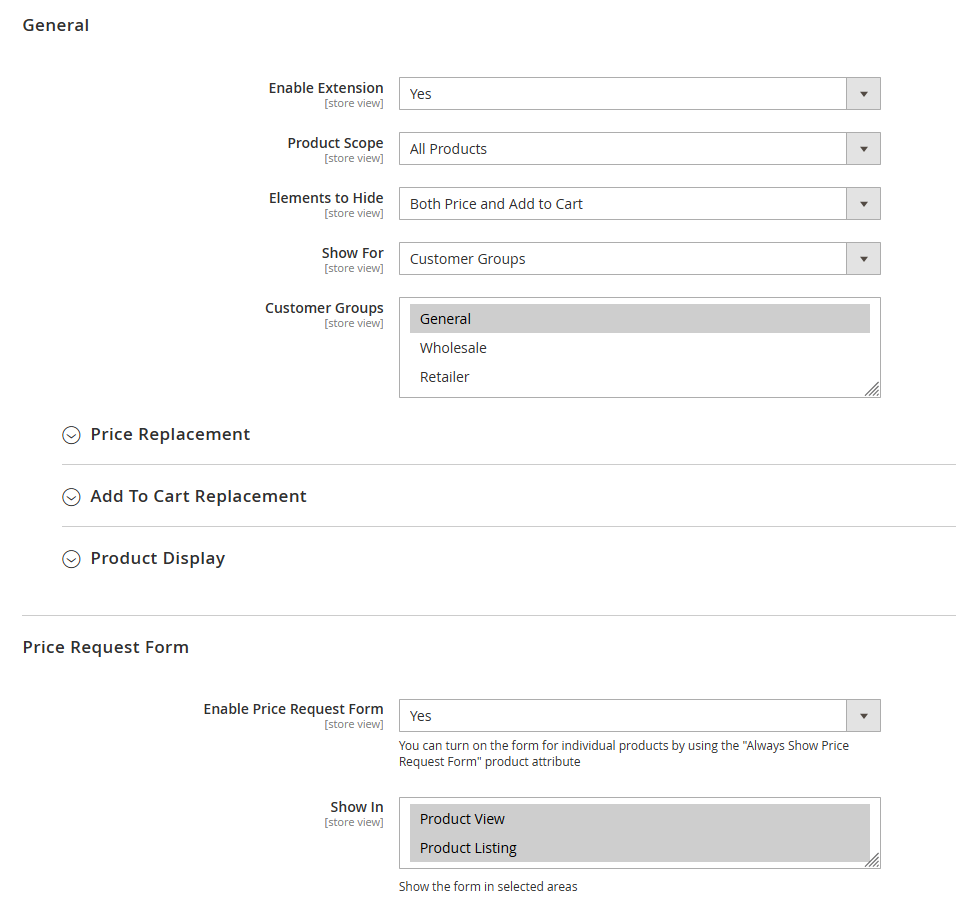
To create a rule:
- In the Magento admin, go to MageMe → HidePrice → Manage Rules.
- Click Add New Rule.
- Fill in Name (internal label) and Priority (lower number = higher priority).
- Under Conditions, choose which customer groups the rule applies to. To hide for guests only, select NOT LOGGED IN.
- Under Scope, pick whether the rule applies site-wide, to specific categories, or to specific products. Leave empty for all products.
- Under Action, choose what to hide:
- Hide Price — remove the price display
- Hide Add to Cart — remove the purchase button
- Replace with text — show a message (e.g. “Call for pricing”)
- Replace with CTA button — show a configurable button (Request Quote, Login to view, etc.)
- Click Save Rule and flush the full-page cache.
The rule takes effect immediately. Test it by opening the storefront in an incognito window (guest session) vs. a logged-in tab.
Replace the price with a “Request Price” button
The most useful pattern for B2B stores is to replace the price entirely with a CTA button that opens a quote form. HidePrice Pro ships with this built in — you don’t need a separate form extension for basic inquiries.
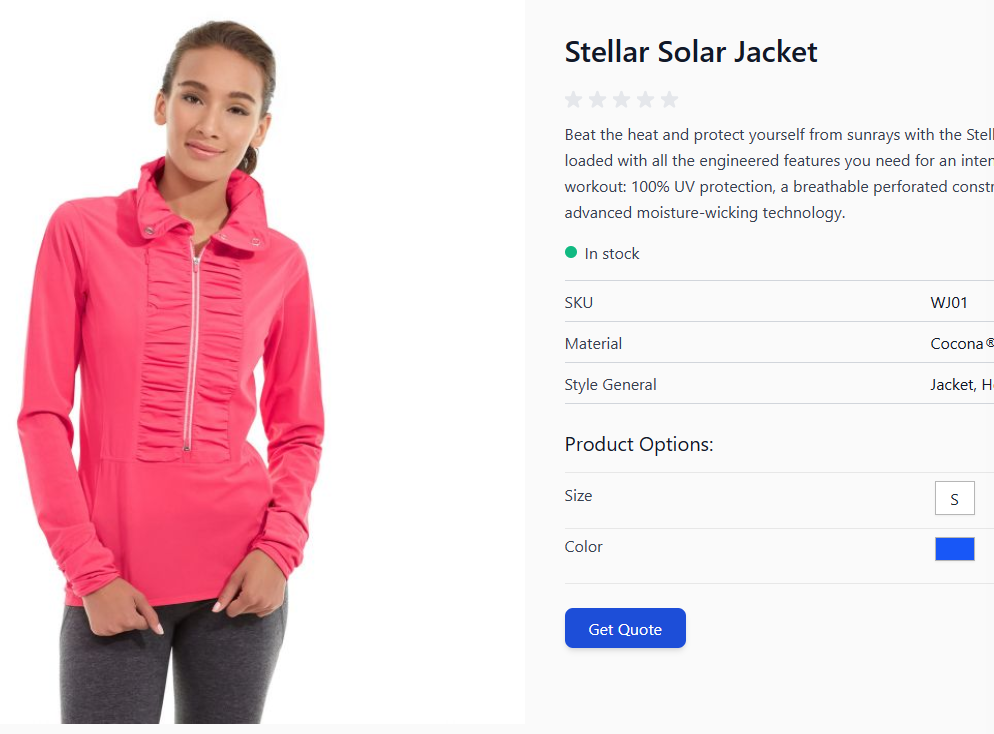
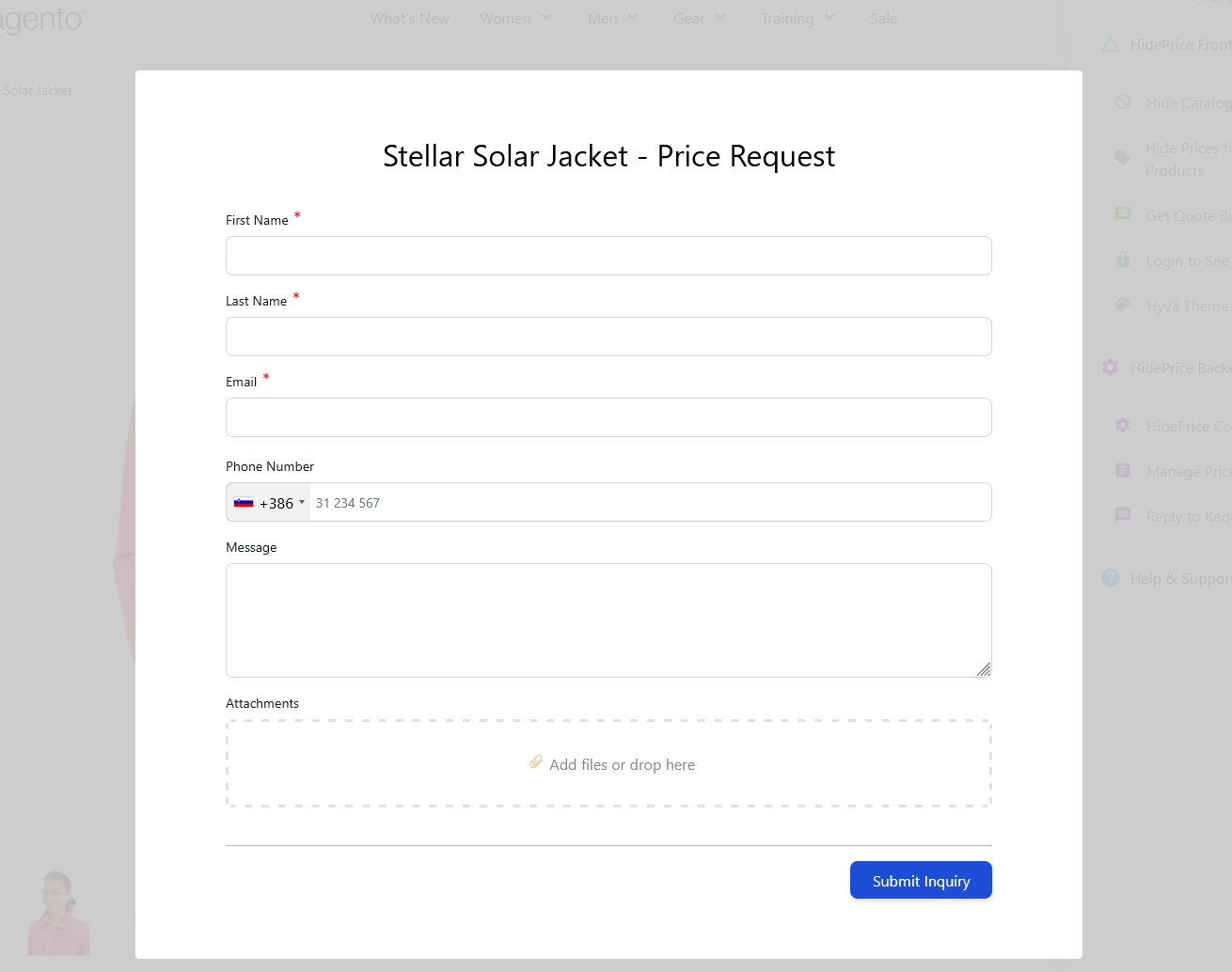
In the rule’s Action section:
- Select Replace with CTA button.
- Set the Button Label (e.g. “Request a Quote”, “Get Pricing”).
- Choose CTA Action: Open inline form, Open popup form, Redirect to login page, or Redirect to custom URL.
- If you chose an inline or popup form, configure which fields to include (name, email, phone, message, quantity, custom notes).
- Under Email Notifications, set the admin recipient for new quote requests and the auto-reply template for the customer.
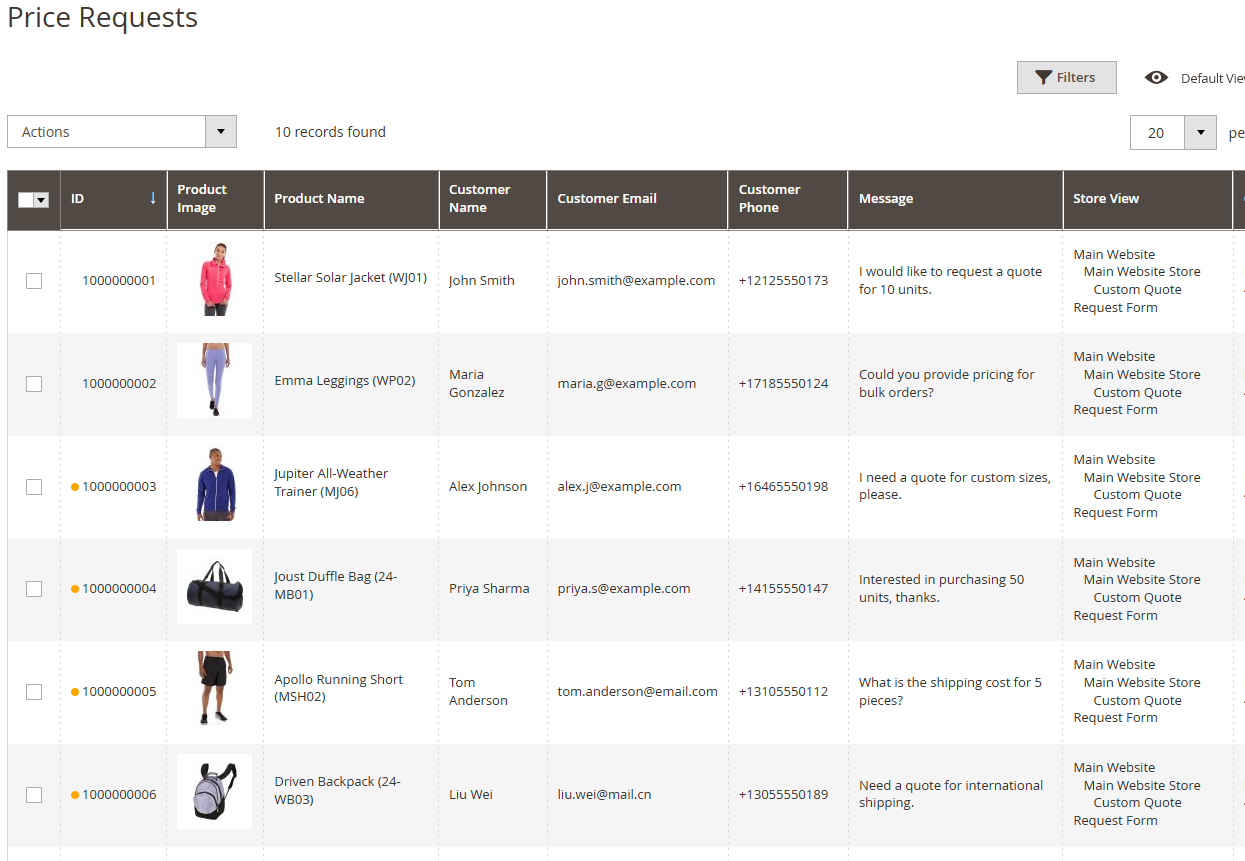
Requests submitted through the CTA form land in MageMe → HidePrice → Price Requests with status tracking (New, Read, Replied) and CSV export. See the HidePrice Pro 3.1 release notes for details on the latest admin grid features.
Combine HidePrice with WebForms for advanced inquiry forms
The built-in HidePrice form is fine for simple inquiries, but if you need file uploads, conditional logic, multi-step flows, or CRM/Zapier integration, pair HidePrice with MageMe WebForms.
The setup is straightforward:
- Build your inquiry form in WebForms (Webforms → Manage Forms) with whatever fields you need.
- Copy the form’s URL or shortcode.
- In the HidePrice rule, set the CTA action to Redirect to custom URL and paste the WebForms form URL.
- Optionally, pass the product SKU as a query parameter:
?sku={sku}. WebForms will prefill that value so the sales team knows which product the inquiry is about.
This gives you the full power of WebForms (file upload for drawings, conditional fields for custom specs, reCAPTCHA, auto-responders) without losing the HidePrice product-page UX.
Upgrade to EasyQuote for a complete RFQ workflow
If your quote flow involves multi-product carts, negotiated tier pricing, proposal PDFs, and formal approval workflows, HidePrice alone isn’t the right tool — you need a full Request-for-Quote system. That’s what MageMe EasyQuote provides.
HidePrice and EasyQuote work together cleanly:
- HidePrice controls visibility — who sees the price, on which products, under what conditions.
- EasyQuote controls the quote lifecycle — cart-based RFQ submission, admin negotiation, proposal PDF, one-click checkout links, conversion to order.
A common B2B stack is: HidePrice hides prices from guests at the catalog level, a “Request Quote” button opens an EasyQuote request that includes the selected products at hidden prices, the sales team sends a proposal with negotiated pricing, and the customer approves it with a single click. The customer never needs to browse the storefront for prices — the whole transaction happens through quotes.
For a full comparison of the leading RFQ extensions (EasyQuote, Cart2Quote, Mageplaza, Amasty, Aheadworks), see our best Magento 2 request for quote extensions roundup.
Other Hide Price extensions for Magento 2
MageMe HidePrice is the approach this tutorial uses, but it’s not the only Hide Price extension for Magento 2. Here are the main alternatives — each with a slightly different angle on the same problem.
MageMe HidePrice
Free core + Pro from €99
Four rule types (guest, customer group, category, site-wide), built-in quote form, CSP-compliant, Hyvä and Breeze ready. What this tutorial configures.
Mageplaza Hide Price
$149 USD (first year, Community Edition)
Popup, login-redirect, and “Call for Price” actions, Hyvä-ready, 60-day money-back guarantee, reporting dashboard. Supports Magento 2.4.4–2.4.8.
Amasty Hide Price
Commercial license
Hides prices by product, category, or customer group, supports MAP (minimum advertised price) compliance, Hyvä compatible. A solid pick if you already run the Amasty stack.
Budget alternatives
~$49–89 USD
Magezon, Webiators, and MageComp all publish lightweight Hide Price modules under $100. Feature set varies — some lack customer-group rules or quote forms.
How to pick: if you need built-in quote capture and free-tier baseline functionality, MageMe HidePrice is the simplest path. If you want a polished admin dashboard and popup-first UX, Mageplaza Hide Price is the closest alternative. For MAP-compliance use cases inside an existing Amasty-based stack, Amasty Hide Price is the natural fit.
Key takeaways
- Decide the strategy first. Hiding for guests, hiding by customer group, hiding by category, and replacing with a form all use different HidePrice rules. Picking the wrong one leads to UX you didn’t intend.
- Free edition covers the basics. If you only need guest or group-based hiding with a text replacement, the free HidePrice module is enough — no license required.
- Pro edition adds quote forms. Inline/popup forms, CSV export, status tracking, and API access are in HidePrice Pro. It’s the simplest path to a “Request Price” button with admin tracking.
- Combine with WebForms for advanced inquiries. File uploads, conditional logic, and CRM routing belong in WebForms, not HidePrice. Link from the HidePrice CTA to a WebForms form URL.
- Use EasyQuote for full RFQ workflows. If you need multi-product quotes, negotiated pricing, PDF proposals, and approval flows, HidePrice is the entry point and EasyQuote is the engine behind it.
Frequently asked questions
Yes. MageMe publishes a free edition of HidePrice that covers hiding prices for guests and by customer group, with a text replacement. It installs via Composer from packagist as mageme/module-hideprice. The paid HidePrice Pro edition adds built-in quote request forms, CSV export, status tracking, API access, and category/product-level rules.
Yes. Create a HidePrice rule with the condition Customer Group = NOT LOGGED IN, leave the scope empty (all products), and set the action to Hide Price and Hide Add to Cart. Guests will see the CTA or text you configured; logged-in customers in any other group see normal prices.
Yes. HidePrice Pro 3.1+ is fully compatible with Hyvä, including CSP-compliant inline scripts for the quote request forms. It also works with Luma, Breeze, and headless setups via the GraphQL API added in 3.1.
Yes, but only with HidePrice Pro. In the rule’s Scope section, select specific category IDs or product IDs and the rule applies only to those. The rest of the catalog continues to display prices normally. This is the recommended pattern for mixed retail-plus-quote stores.
Hidden prices are removed from the storefront HTML, so Google Shopping and price-comparison crawlers won’t index them. This is usually the desired behavior for B2B stores. If you run Google Shopping campaigns in parallel, scope the HidePrice rules to specific customer groups (e.g. dealer-only) and leave public prices intact for retail products.
HidePrice Pro includes built-in inline and popup quote forms. For advanced needs (file uploads, conditional logic, multi-step flows), set the CTA to redirect to a MageMe WebForms form URL. WebForms can receive the product SKU as a query parameter and prefill it in a hidden field, so the sales team knows which product the inquiry is about.
HidePrice controls price visibility — who sees a price on a product page. EasyQuote manages the quote lifecycle — multi-product carts, negotiated pricing, proposal PDFs, approval flows, and conversion to orders. For a simple “Request Price” button on individual products, HidePrice is enough. For full B2B RFQ workflows, use both together or use EasyQuote alone.
HidePrice Pro 3.x supports Magento 2.4.4 and above (both Community and Adobe Commerce), including 2.4.6 and 2.4.7. PHP 8.1 and 8.2 are both supported. The extension is tested against Luma, Breeze, and Hyvä themes.
Tried this guide? Share your experience!

Related Posts





Related Products

HidePrice Pro
Manage price visibility in your Magento 2 store with our Hide Price plugin. Hide prices or 'Add to Cart' buttons, and replace them with cus…
View Product
EasyQuote
Magento 2 Request for Quote extension for B2B commerce. Cart-integrated RFQ workflow with tier pricing, quick checkout links. Hyvä compati…
View Product